




10X more data, same 4 seconds: testing Redpanda SQL at scale
A benchmark on how a single analytical query behaves as the dataset and cluster grow


A detailed look at the bug we found and the compaction algorithm that solved it








In compacted topics, Apache Kafka® retains only the latest value for each key. Tombstones (records with a null value) can be used to express a deletion of a key. Once compaction has deleted all the value records, Kafka waits for at least delete.retention.ms and removes tombstones as well. This approach prevents bloating the topic with tombstones for long-gone keys.
But there’s a problem (actually, there are four). In this post, we describe the bug we found and how coordinated compaction solves it in Redpanda Streaming.
To understand the problem, here’s a brief explanation of how Kafka’s log compaction currently works.
Compaction affects transaction control batches. In a transactional write, a producer first writes the data records (possibly across several partitions), then appends a COMMIT or ABORT control batch to each partition. Consumers running with isolation.level=read_committed use those markers to decide whether to deliver the transaction's records or hide them.
Control batches sit in the log like ordinary records, and in a compacted topic, compaction applies the same expiration-based rules to them: once the data they resolve has been compacted and enough time has passed, the marker can be removed as well. This allows efficient cleanup of old data and metadata. Not only are data records and tombstones for removed keys compacted away, but also associated transaction control batches.
Tombstones and COMMIT/ABORT control batches are the only signals that their associated records were deleted, committed, or aborted, respectively. Once a tombstone or a control batch is compacted away, this information is gone.
This can lead to catastrophic consequences: compaction may remove a tombstone or a control batch on one replica while another still needs it. Each broker compacts its own log independently. A replica that lacks a tombstone or marker still retains associated records. When it rejoins, the leader no longer has the tombstone or the marker to replicate. The replicas then permanently disagree about what's in the log, and which version a consumer sees depends on which broker is the leader at read time.
The bug reproduces reliably on Kafka 3.9 through 4.2. We've found four variants, ranging from "deleted data reappears" to "aborted data is served as committed". Next, we’ll describe all four, walk through a reproducer for one of them, and explain how we closed the gap.
When a broker falls behind or goes offline, it drops out of the ISR (in-sync replica set). Meanwhile, the remaining brokers keep accepting writes and keep compacting as usual. If a critical record (tombstone, COMMIT marker, or ABORT marker) is written while one replica is unavailable—and compaction removes it before the replica catches up—the replica never learns about it. From its point of view, the record never existed.
Kafka's safeguards are time-based. A tombstone becomes removable delete.retention.ms (default 24 hours) after it is written. For transaction control batches, cleanup happens in two steps:
delete.retention.ms, the marker batch itself is replaced by an empty batch that still carries the producer ID and the COMMIT/ABORT flag in its header.producer.id.expiration.ms (also 24 hours by default, timed from the last producer activity), the empty batch may also be discarded. A broker that's offline or lagging past these timers (due to a hardware failure, a long maintenance window, or a slow recovery) will miss both the marker and its empty-batch remnant, with no way to recover.
We observed four manifestations of this problem, depending on which metadata record is lost. Each scenario below involves a 3-broker cluster in which Broker 2 goes offline for a prolonged period.
A tombstone for key K is written while Broker 2 is down. Brokers 1 and 3 compact away both the original value and the tombstone. When Broker 2 rejoins, there is no tombstone left to replicate, so it keeps the original record. Brokers 1 and 3 consider K deleted; Broker 2 serves K=V. Which one a consumer sees depends on who the leader is.
A producer does two transactions with the same transactional.id:
poison=SHOULD_NOT_SEE_THIS, then ABORT.good=data, then COMMIT.If Broker 2 misses the ABORT marker for TX1 and it's compacted away on other brokers, Broker 2 still has the poison data in its log. When it rebuilds its transaction state, the next control batch from the same producer is TX2's COMMIT, and Broker 2 applies it to TX1's data too. The poison record is then served to read_committed consumers as valid, committed data. Data the application explicitly rolled back is delivered to downstream systems as real, and nothing in Kafka flags it.
Similar to the issue above. The producer commits some good data in TX1, then produces some garbage and aborts in TX2. If Broker 2 misses the COMMIT marker for TX1 and it's compacted away, then when Broker 2 sees TX2's ABORT it applies it to TX1's data. Committed data is reclassified as aborted and disappears from read_committed consumers.
READ_COMMITTED frozenA producer begins a transaction, writes K=V, and commits. The COMMIT marker tells read_committed consumers that the data is now visible. If Broker 2 misses the COMMIT marker and it's later compacted away together with its empty-batch remnant, Broker 2 still has the transactional data but does not know the transaction was finished. It treats the data as uncommitted and pins its Last Stable Offset (LSO) at that offset.
When Broker 2 becomes leader, read_committed consumers see nothing past that point: the partition is frozen for them even as data keeps being written to it. The pin lasts until Broker 2's own producer.id.expiration.ms elapses from the last record of that producer in the log — 24 hours by default, and effectively indefinite if the same producer keeps writing new transactions that refresh the PID's last-activity timestamp.
Reproducer scripts are in the companion GitHub repo, all you need is Docker Compose. Each diverge.sh script accepts a command-line argument to tune Kafka so that it takes less time to reproduce. With default settings, it will take about two days.
This is how to run the aborted-to-committed variant with a lower delete.retention.ms in automated mode:
git clone https://github.com/redpanda-data-blog/kafka-log-compaction-bug-fix.git
cd kafka-log-compaction-bug-fix/kafka-compaction-divergence/aborted-to-committed
./diverge.sh 10m   # aggressive compaction settings, aim to complete in 10 minutes
You can also run it step by step. First, source the setup: it pulls in the helper functions used below, and defines the test-time-scaled values.
git clone https://github.com/redpanda-data-blog/kafka-log-compaction-bug-fix.git
cd kafka-log-compaction-bug-fix/kafka-compaction-divergence/aborted-to-committed
source ./setup.sh 10m
Start a fresh 3-broker cluster:
docker compose down --volumes 2>/dev/null
docker compose up -d
sleep 10
Create a compacted topic. The only override is delete.retention.ms (default 24 hours, scaled down from the test duration by setup.sh):
kafka_topics --create --topic foo --partitions 1 --replication-factor 3 \
    --config cleanup.policy=compact \
    --config delete.retention.ms=$DELETE_RETENTION_MS
Start the Python producer (it uses confluent-kafka, baked into the txproducer image via txproducer.Dockerfile). It begins TX1, produces key=poison value=SHOULD_NOT_SEE_THIS, then waits:
docker compose exec -d txproducer python3 /scripts/aborted-to-committed.py
wait_for_signal tx1_produced
Verify that all three brokers have the transactional data in their ISR. Broker 2 now has the poison record in its log, unresolved:
while ! kafka_topics --describe --topic foo | grep -qP 'Isr:\s*[123],[123],[123]'; do sleep 1; doneMove all __transaction_state leaders off Broker 2 first (otherwise, if Broker 2 happens to host our transactional.id's coordinator, the upcoming commit will hang on coordinator failover). Then kill Broker 2 and wait for leadership of the foo partition to move off it. Broker 2 will miss everything that follows:
move_tx_coord_off 2
docker compose kill kafka2
while [ "$(get_leader)" = "2" ]; do sleep 1; done
Signal the producer to abort TX1. Only brokers 1 and 3 receive the ABORT marker:
docker compose exec -T txproducer touch /tmp/signals/do_abort
wait_for_signal tx1_aborted 180
Pump ~1GB of filler to force a segment roll, wait delete.retention.ms for the ABORT marker to become removable, pump another 1GB, then run a few extra cycles to let the cleaner remove the aborted data, the ABORT marker record, and the empty batch it leaves behind:
pump_1gb; sleep "$SLEEP_S"; pump_1gb
while [ "$(kafka_consume "$BOOTSTRAP" read_uncommitted | grep -c '^poison')" -gt 0 ]; do
    pump_1gb; sleep 15
done
for i in 1 2 3 4 5; do pump_1gb; sleep 15; done
Signal the producer to produce TX2 (key=good value=data) and commit:
docker compose exec -T txproducer touch /tmp/signals/do_tx2
wait_for_signal tx2_committed
At this point, the COMMIT marker for TX2 is fresh in the log on brokers 1 and 3. On those brokers, a read_committed consumer sees good=data and nothing with poison:
kafka_consume "kafka1:9092,kafka3:9092" read_committed | grep "^poison"
# no output; correctly aborted
Now bring Broker 2 back, wait for it to rejoin the ISR, and force leadership to it:
docker compose start kafka2
while ! kafka_topics --describe --topic foo | grep -qP 'Isr:\s*[123],[123],[123]'; do sleep 1; done
force_leader 2
Read from Broker 2 with read_committed:
kafka_consume "kafka2:9092" read_committed | grep "^poison"
# poison	SHOULD_NOT_SEE_THIS
Broker 2 still has the poison data in its log. When it rebuilt its transaction state, the first control batch it saw from that producer was TX2's COMMIT, so it treats TX1's data as committed. The application aborted TX1, yet consumers reading through Broker 2 get the poison record as valid data. Same topic, same partition, same log contents on disk, but read_committed consumers see different results depending on which broker they read from.
Redpanda Streaming respects delete.retention.ms. Without it, a slow consumer could see an earlier value for a key but miss its tombstone or transaction marker if that was removed in the meantime. But there's no guarantee that a replica will not be offline or lagging for longer than delete.retention.ms.
To behave correctly even during prolonged broker outages or slowness, Redpanda runs a small coordination protocol on top of compaction that keeps a tombstone or control marker in place until every replica has compacted the associated data records.
Coordinated Compaction uses two values per partition:
The protocol works in two phases:
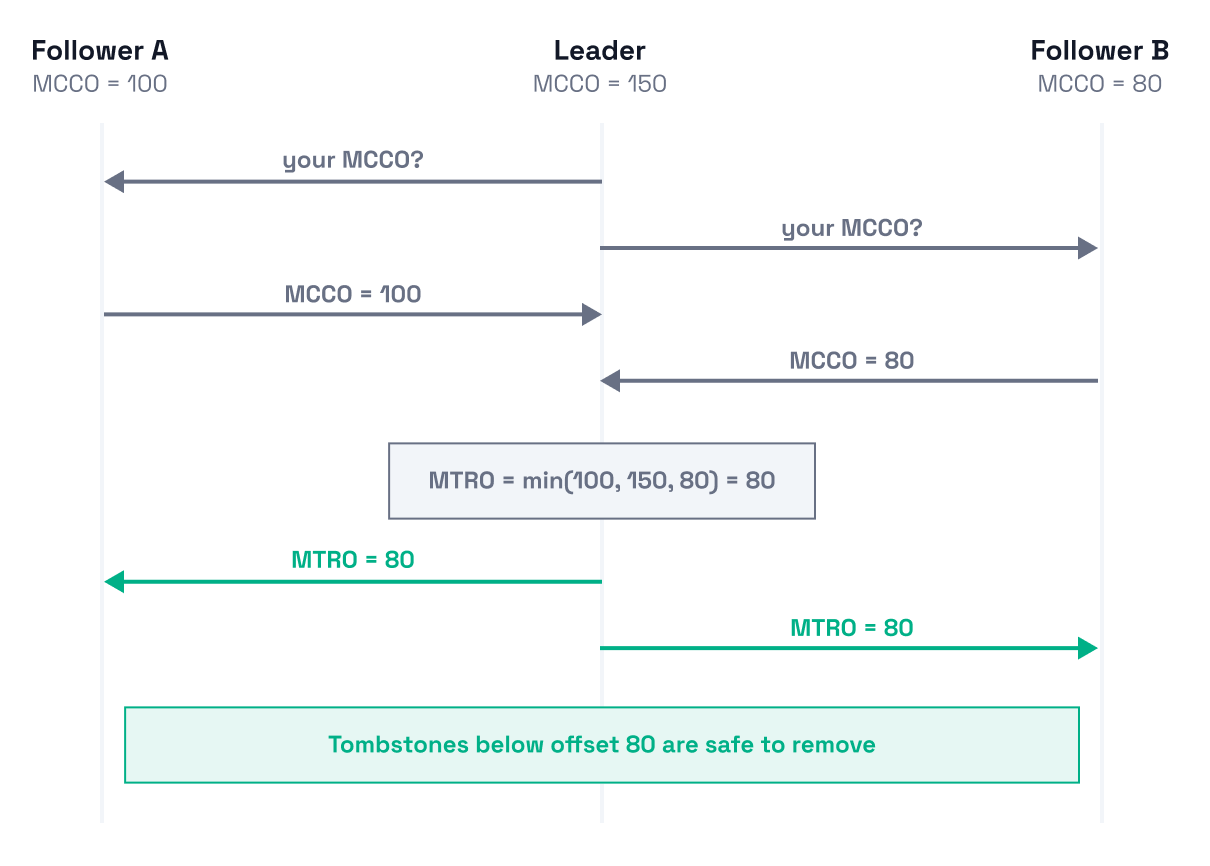
Every replica now knows that records at offsets below 80 are safe to remove, and records at 80 or above must be kept until compaction on the slowest replica catches up.
Leadership changes. When a new leader is elected, the new leader uses the previously distributed MTRO value as its starting point. It then begins collecting MCCOs from all followers to compute a fresh MTRO. The new leader re-broadcasts MTRO even if the value hasn't changed, since followers may have missed the last update during leadership transition.
Replication membership changes. When a replica is added to the group, its MCCO is initialized to the group's current MTRO. MCCO may go above the replica's local log end, which looks odd but is correct: the new replica will receive its log from another replica that's already cleanly compacted up to MTRO. When a replica is removed, MTRO may advance since the departed replica's MCCO might be the lowest of all.
MTRO never goes backward. Once a cleanup decision is made, it's permanent. Attempts to move MTRO backward (for example, by a late RPC from a previous leader) are ignored.
A similar pair of offsets is maintained to guard transaction marker deletion:
Even if a replica stays offline for a period of time, MTRO/MXRO do not move forward, so tombstone and marker removal above those offsets pauses across the cluster. This is an intentional design choice: correctness is a guarantee, compaction is best-effort. Once the replica rejoins and compacts, its MCCO/MXFO advances, the leader recomputes MTRO/MXRO, and cleanup resumes.
The coordinated compaction algorithm allows Redpanda Streaming to make optimal cleanup decisions even under extreme conditions, such as heavy load or prolonged node outage. Brokers collectively determine which records can be deleted and free as much storage space as possible without compromising data safety.
If you have questions about anything in this blog, just ask in the Redpanda Community on Slack. If you’re interested in more behind-the-scenes work from Redpanda engineers, browse our latest blogs:
A genuine thanks to our engineers Nicolae Vartolomei and Willem Kaufmann for reproducing the erroneous behavior in Kafka.
A benchmark on how a single analytical query behaves as the dataset and cluster grow

Fewer wasted CPU cycles and lower storage costs while keeping compaction correct

Solving a Kafka problem to balance batching efficiency against latency and cost
Subscribe to our VIP (very important panda) mailing list to pounce on the latest blogs, surprise announcements, and community events!
Opt out anytime.