

4 digital transformation use cases in manufacturing with Redpanda
How Redpanda powers data streaming and AI agent governance for global manufacturers


Automating IT service desk triage with a governed AI agent in Microsoft Teams








Service desks often spend their time preparing requests rather than resolving them. For a broken laptop or a software license request, an analyst collects missing details, corrects ticket fields, and routes work to the right team. Each handoff adds time, especially when tickets require extra steps, like approvals before IT can act.
An AI assistant can take on that preparation, but only if it produces a usable record while following the organization’s rules, keeping the employee’s identity, and respecting existing approvals.
At Redpanda, we built an IT assistant like this for an enterprise customer. In Microsoft Teams, the assistant reads the company’s IT forms, gathers missing details, and submits requests through existing IT service management (ITSM) workflows. A custom integration applies the customer’s workflow rules, and the existing ITSM platform keeps all its records, permissions, and approvals.
In its first week, our IT assistant answered 36% of employee requests on its own using existing knowledge base articles. Those requests never became tickets or involved any humans.
This post walks through how the IT assistant works, where each request is checked, and the controls that keep IT in charge.
Before the assistant, the service desk ran on people and a ticket database. An employee submitted a ticket, and an analyst checked its fields, filled in missing information, and assigned it to the responsible group. IT also received questions already answered in knowledge articles because employees rarely searched the knowledge base. Routing depended on local conventions and knowing who owned what, and a handoff between geographic queues could mean waiting for another team’s working hours.
Automating that work took more than filling in a form. The ITSM platform already defined the forms, accepted values, routing rules, and approvals, and those rules could change by request type and depend on earlier answers. Access was uneven, too. An employee might be allowed to create a request without being able to read every field stored on it, so a successful API response didn’t prove the record was complete.
The customer also set clear boundaries for the assistant:
These requirements shaped both the integration and the controls around it, as the next sections show.
The assistant lives in the customer’s existing Microsoft Teams. When an employee submits something, the assistant first works out whether they’re asking a question, reporting an incident, or ordering something from the service catalog, since each path needs different information and a different way to submit.
Say an employee reports a broken laptop. Here’s how the assistant would handle it:
Because the integration reads form definitions each time a request arrives, IT keeps maintaining forms in the ITSM platform as before. When IT changes a supported form rule, the assistant follows it without a separate release.
Catalog requests work the same way. For a software license that requires training acknowledgment, the assistant shares the training notice and link, collects the employee’s response, and then submits the request. The employee does everything in chat, and IT still owns the form’s requirements.
We built the IT assistant using the Redpanda Agentic Data Plane, a governance and runtime layer for AI agents. This layer sits between the agents and all the data, tools, identities, and models they access.
Every model call and tool call from the IT assistant passes through the Redpanda Agentic Data Plane’s AI Gateway. Instead of giving the model open access to the ITSM platform, we built a custom Model Context Protocol (MCP) server that exposes only specific IT tasks, like finding an article, reading a form, or creating an incident. It has no general query tool over platform tables, which narrows the operations the assistant can attempt to the ones the server defines.
The following diagram shows the logical request path and where the responsibilities sit:
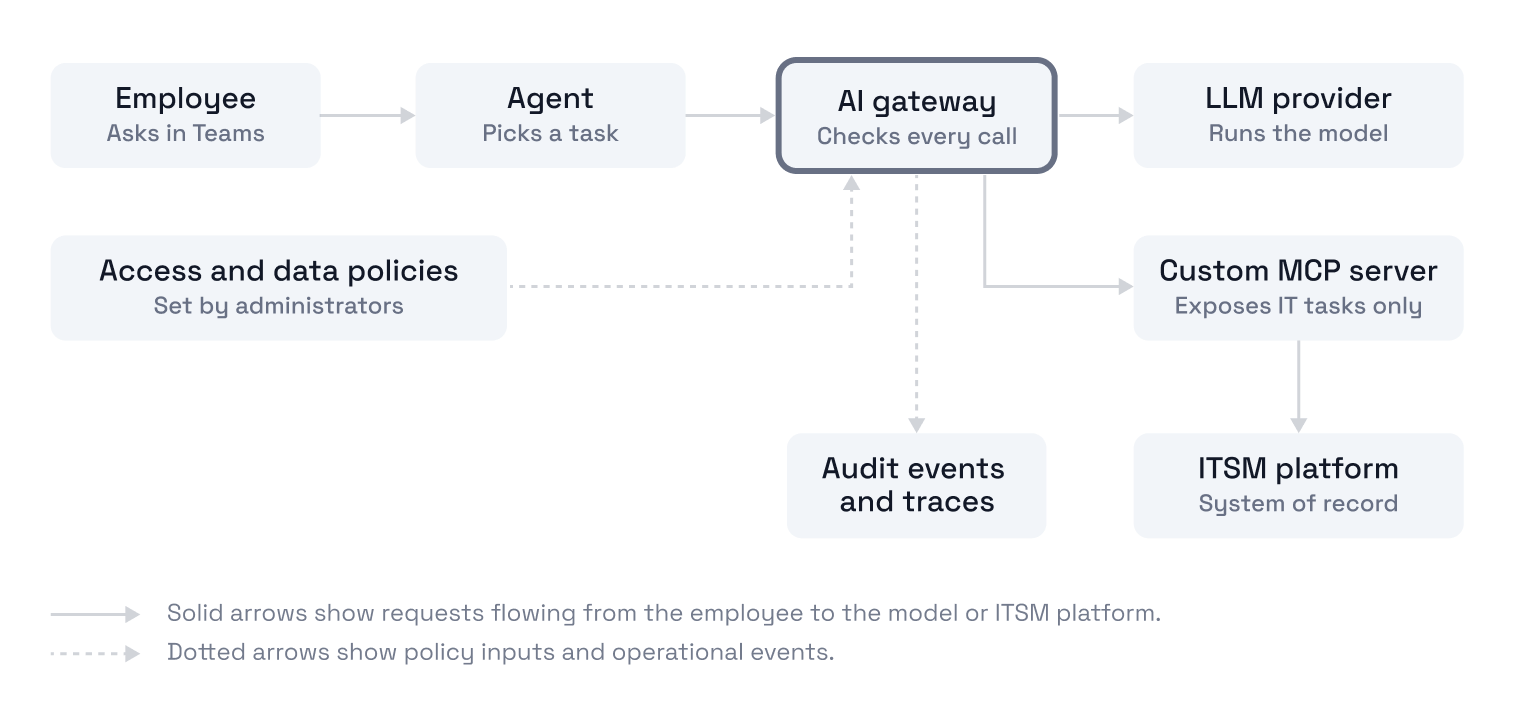
Each step has its own job. The model picks a task and proposes arguments, and the gateway checks whether the call may proceed. The MCP server turns the task into a validated application request. The ITSM platform then applies its own permissions, submission logic, and approval workflows, and remains the system of record.
The Redpanda Agentic Data Plane gives administrators control over who can use the assistant, which tools it can call, and what data those calls can send or return.
Note: The Redpanda Agentic Data Plane’s controls depend on configuration and version. This section describes what the platform supports, and not every control here was enabled in the customer’s deployment.
Any change the assistant makes uses the employee’s own account, so it can only do what that employee could do themselves. The Redpanda Agentic Data Plane checks whether the caller may use a model or tool, and then the ITSM platform decides what the account can read or change.
The Redpanda Agentic Data Plane picks the employee’s OAuth connection from its token vault based on their authenticated identity. The vault encrypts tokens, isolates them by tenant and user, and handles token refresh, so credentials don’t need to appear in agent instructions or tool arguments.
A separate account, accessed through a read-only client, supplies form definitions and narrowly scoped lookups, such as checking a newly created request. Those reads can still expose enterprise data, so this account’s permissions need their own review.
Confirming a request in chat doesn’t replace approvals. If the ITSM workflow requires a manager’s sign-off, that still happens.
Administrators can let everyone search knowledge while restricting the tools that create or change records. The Redpanda Agentic Data Plane uses Cedar policies that check who is making a request, which action they want, and which resource it affects. Conditions can use group membership and supported resource attributes, so a support group can invoke selected tools without being able to change their configuration.
Cedar’s rules are explicit. If no policy permits a request, it’s denied, and a matching forbid overrides any permit. In the Redpanda Agentic Data Plane, a forbid that fails to evaluate also denies the request. All of this happens before the tool runs. Policy updates propagate asynchronously, so check enforcement after making a change.
Check Redpanda's access-policy documentation for the full policy model.
Together, the task-specific MCP server and the gateway’s permissions limit what the assistant can do, even when the model misreads a request.
Data policies limit what an authorized tool call can send or return. For an IT assistant, that might mean constraining incident priority values or removing fields the model doesn’t need.
Request rules constrain argument values or strip fields before a call goes out. Response rules mask or drop fields and filter records before results reach the model. When several policies match, they combine restrictively, and a call is denied if a matching rule can’t be enforced. Data policies are currently in preview.
See: data-policy documentation
The customer's requirements include refusing a direct demand for the highest incident priority and leaving incident closure to humans. A connector that exposes those arguments can use data policies to restrict them. A narrower tool server can leave those operations out entirely. These are possible enforcement mechanisms, not evidence of which policies were deployed for this customer.
Constraints can also appear in the tool schema the model sees. That guides the model up front, and the gateway checks again when the call runs. For this to work, the rules must match the actual tool schema, including alternate argument paths.
Guardrails let administrators check conversation content as well as tool access. The Redpanda Agentic Data Plane supports guardrails on large language model (LLM) providers that scan prompts and responses for sensitive information, disallowed topics, and prompt attacks. Depending on the policy, they can detect or block matching content, or redact sensitive output.
The documented backend is Amazon Bedrock Guardrails, even when another provider hosts the model. In that case, the gateway sends text to Bedrock for evaluation, so include its destination and region in your data handling review. If a required guardrail check fails, the gateway rejects the request.
See: Guardrail documentation
Guardrails won’t catch every malicious instruction, which is why tool permissions, argument constraints, and the ITSM platform’s own checks still matter.
{{featured-resource}}
If an employee says a request went missing, operators need to trace what happened beyond the chat. OpenTelemetry connects agent activity, model calls, and tool calls. With audit recording enabled, security events use the Open Cybersecurity Schema Framework (OCSF) to record the actor, operation, resource, and outcome. The gateway’s MCP audit path records authorization decisions and results, including refusals, and configured event producers publish them to Redpanda topics for retention and analysis.
See: Observability documentation
Engineers can then compare the conversation, the gateway’s decision, the tool result, and the saved ITSM record to see why a ticket differs from what the employee asked for. Traces and audit records can contain sensitive data from arguments and conversations, so limit who can access them.
Operators can set spending limits for model calls made under an agent’s identity. Once recorded spending reaches the limit, the gateway rejects the next model request. If current spending can’t be read, the request goes through, so treat the limit as a strong safeguard rather than a hard ceiling.
See: Budget documentation
With the assistant, our enterprise customer’s employees can find answers and file IT requests without leaving Teams, and IT still owns the forms, permissions, and approvals behind them.
If your service desk spends its days chasing missing details, start with one request type, like hardware incidents, and expand from there. You can then go further and learn how to reuse the same AI agent across other teams.
But first thing’s first. To build your own agent on the Redpanda Agentic Data Plane, start here:
Prefer to see it in action first? Watch the demo.
How Redpanda powers data streaming and AI agent governance for global manufacturers
A benchmark on how a single analytical query behaves as the dataset and cluster grow

Fewer wasted CPU cycles and lower storage costs while keeping compaction correct
Subscribe to our VIP (very important panda) mailing list to pounce on the latest blogs, surprise announcements, and community events!
Opt out anytime.