Full CDC semantics land in the Iceberg output for Redpanda Connect
Your lakehouse mirrors the database, instantly.


How Redpanda Agentic Data Plane keeps IT, HR, and ops agents unified and controlled across reuses








The IT team ships a helpdesk bot. It works, and people like it. Six months later HR wants an onboarding assistant, and since new hires need laptops and software, that bot has to talk to ServiceNow as well. Then operations wants something that opens incidents when monitoring fires at 3 AM.
Before long, there are three ServiceNow integrations written by three teams, three sets of credentials sitting in three places, and three different opinions about what should be logged. None of those teams did anything wrong. Each one solved the problem in front of it. The trouble shows up later, when an auditor asks who approved the software license an agent requested last quarter and nobody can answer without digging through three systems.
The fix is to treat agents the way we already treat good internal services. Build the capability once, govern it properly, and let other teams call it instead of copying it.
This post follows one IT agent through two reuses and looks at what the Redpanda Agentic Data Plane does at each step.
For the unfamiliar, the Redpanda Agentic Data Plane is a unified governance layer that mediates the access, information, and oversight agents need to do real work across your organization. Read what an agentic data plane is to learn more.
The IT Assist Agent does two things employees ask for constantly:
You tell it, “My VPN keeps dropping,” or “I need a Figma license” in Teams, and it handles the ServiceNow side. It also searches the knowledge base, which heads off some tickets before they're opened.
.png)
Under the hood, it's one agent with three subagents, one each for incidents, catalog, and knowledge. An orchestrator reads the request and hands it to the right one.
On the Redpanda Agentic Data Plane the whole thing is configuration rather than code. The agent is Redpanda-managed, so you write the system prompt, pick a model, and attach tools, and the Redpanda Agentic Data Plane runs it and keeps a record of every run. Each subagent gets its own instructions and its own MCP servers (Model Context Protocol).
The ServiceNow side comes from the managed ServiceNow MCP server, which covers incidents (create, update, transition, add work notes), knowledge search, and the catalog flow of searching for an item, reading its request form, and submitting the order (search_catalog_items, get_catalog_item, submit_catalog_request). Redpanda hosts that server, and the ServiceNow credentials live in the Redpanda secret store. The agent never sees them.
Two governance details matter here, because they're what make this agent safe to share later. First, the Redpanda Agentic Data Plane authorizes every action as the person talking to the agent, so the agent can only do what that employee could do themselves. Second, access policies can allow or deny individual MCP tools for a user, a group, or an agent, and they're enforced outside the model. A creative prompt can't argue its way into a tool call the policy blocks.
{{featured-resource}}
Now the People team wants an onboarding assistant for new hires and their managers. New hires need to see their Day 1 to Day 90 tasks, which live in Workday, and find policies and team pages in SharePoint. They also need a laptop, software access, and help when the VPN won't connect on their first morning.
That last part is already the IT Assist Agent’s job, so the People team simply calls it instead of rebuilding it. For everything else, the team builds two specialists of its own: an HR Tasks Agent for Workday and a Docs Agent for SharePoint.
.png)
Every Redpanda agent publishes an agent card at a well-known URL that lists its skills and explains how to authenticate. The People team builds its onboarding orchestrator in whatever framework it prefers and registers it with the Redpanda Agentic Data Plane as a self-managed agent. Registration makes them state up front which agents and tools the orchestrator may call, IT Assist among them. From then on, the orchestrator reads IT Assist's card and sends it requests over A2A (Agent2Agent protocol). IT keeps owning and improving IT Assist. The People team never has to learn ServiceNow.
Workday and SharePoint are new, and neither has a managed MCP type in the Redpanda Agentic Data Plane today. There are two ways in. The OpenAPI managed type takes an OpenAPI 3.0 spec and generates one MCP tool per operation, with no code to write. Or, if the team already runs an MCP server for either system, the Redpanda Agentic Data Plane can front it and apply the same authentication, policy, and observability it applies to everything else.
One thing I like about this design is that onboarding doesn't wait for the new hire to say hello. When Workday records a hire, the event lands on a Redpanda topic. A Redpanda Connect pipeline picks it up and calls the orchestrator through the a2a_message processor, so the new hire gets a welcome message and the manager gets a checklist before Day 1, without anyone typing a prompt.
Onboarding conversations are full of personal data, and the Redpanda Agentic Data Plane lets each managed agent decide how much to keep. Full transcripts, metadata only, or nothing at all. A team can track timing and token usage for operations without storing what was said.
Identity carries through the whole chain. With the ServiceNow MCP server set up for User OAuth, ServiceNow sees the new hire as the requester rather than a bot account, and manager approvals work the way they did before anyone built an agent.
Consider the operations team. Monitoring tools produce alert storms. MDM (mobile device management) tools flag laptops that have drifted out of compliance. Nobody wants to paste any of that into a chat.
.png)
The trigger here is an event. A Redpanda Connect pipeline reads alerts from a topic with the redpanda input and hands each one to a triage agent, again self-managed, through a2a_message. The triage agent collapses a storm of duplicates into one issue, asks the Docs Agent for the relevant runbook, then asks the IT Assist Agent to open the ServiceNow incident and link the affected configuration item from the CMDB (configuration management database). The result goes back onto a topic such as ops.incidents.created, where on-call tooling and dashboards pick it up.
IT Assist has no idea a pipeline called it rather than a person, and it doesn't need to. Same tools, same policies. The one difference is identity. With no human behind the request, the call runs under the pipeline's own service identity, so you grant that identity exactly what triage needs. Incident tools, yes. Catalog orders, no.
After two use cases, the shape is obvious. A handful of capability agents, each with a clear owner, sit in a registry. Chatbots and headless pipelines compose them.
.png)
Ownership stays with the team that knows the domain. IT owns IT Assist. The People team owns the HR Tasks and Docs agents. Tags on each agent break LLM spend down by team or environment, so there's no argument about whose budget the onboarding bot's ServiceNow calls land on.
When IT ships IT Assist v1.4, every consumer gets it, and nobody else changes a line. And since agent definitions can be managed through GitOps with rpk ai apply, a change to a shared agent goes through review like any other production change.
Guardrails, access policies, and budgets all live at the gateway and apply to every call that passes through it. Budgets are per agent. Once an agent hits its cap for the period, the gateway rejects its next LLM request until the period resets, and a warning threshold fires before that happens.
Reuse has a cost. The moment the onboarding agent hands work to IT Assist, or a pipeline acts with nobody watching, the calling team loses sight of what happened next. If each team can only see its own logs, every delegation is a blind spot.
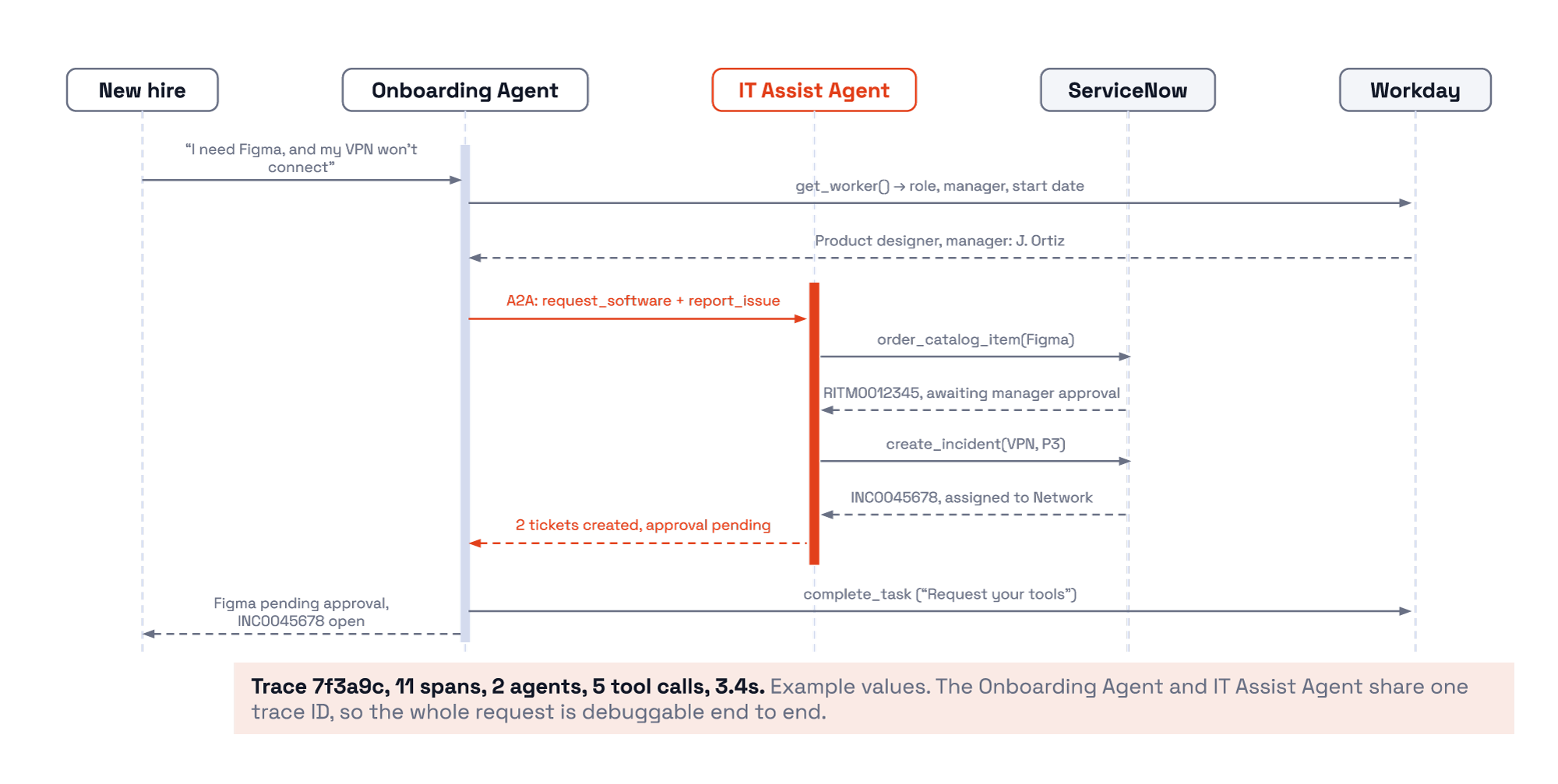
The Redpanda Agentic Data Plane records what happens at two levels. Transcripts give a read-only view of every agent run: each prompt, response, and tool call, plus token usage, status, duration, and a timeline you can click through. Underneath are OpenTelemetry traces at 100% sampling.
The AI Gateway and every managed agent and MCP server write to the redpanda.otel_traces topic on Redpanda's immutable log automatically. Self-managed agents like the onboarding orchestrator export their own spans to the environment's OTLP (OpenTelemetry Protocol) endpoint using the OpenTelemetry GenAI conventions. It all ends up in the same place, and you can inspect a single MCP tool call with full timing, replay runs for evaluations, or materialize everything to Apache Iceberg™ tables for long-term retention.
So the onboarding team can follow a conversation into IT Assist and see that the Figma request became RITM0012345 and is waiting on the manager, and that the VPN incident was opened on behalf of a specific new hire. That's more than a convenience. ServiceNow catalog submissions aren't safe to retry, since a second call raises a second request that someone has to cancel. Being able to confirm the first call went through before anyone tries again saves real cleanup.
For the alert pipeline, the same records are the audit trail. Every automated ticket traces back to the alert that caused it, which is what frameworks like ISO/IEC 42001 and the EU AI Act will ask you to show.
Pick the thing more than one team keeps rebuilding. For a lot of companies that's IT requests, but for you it might be customer lookups or order status. Build it once as a governed agent, publish its card, and have the next team call it rather than copy it.
To try it, check out these resources:
If you’d rather see it in action first, watch the demo.
Subscribe to our VIP (very important panda) mailing list to pounce on the latest blogs, surprise announcements, and community events!
Opt out anytime.