Push-button migration from Confluent to Redpanda
Redpanda Shadowing now carries topic data, schemas, offsets, and ACLs on a single link for a low-risk, no-data-loss cutover


Have your real-time cake and eat your analytics too








If you've ever built a streaming pipeline that lands data in an Iceberg lakehouse, you've felt this tradeoff in your bones.
You want fresh data in your analytics layer, ideally within seconds of it being produced. So you flush from your Redpanda topic into Iceberg often: every minute, maybe every thirty seconds. But now your storage layer is littered with thousands of tiny Parquet files. Compression ratios are mediocre, every query opens hundreds of files, your Iceberg catalog metadata balloons, and you're running a compaction job around the clock just to keep things tidy.
Or you go the other direction: flush less often, get nicely-sized Parquet files, and accept that your "real-time" dashboard is now showing data from an hour ago.
The newly released Redpanda SQL offers a way out of this tradeoff, and the feature that makes it possible is called a bridge query.
Redpanda SQL is a PostgreSQL-compatible OLAP query engine that turns your Redpanda topics (including their Iceberg history) into queryable SQL tables, without any ETL, connector fleet, or separate analytics warehouse.
A few things worth knowing about it:
{{featured-resource}}
A bridge query is a single SQL query that transparently reads from both an Iceberg table and the underlying Redpanda topic that feeds it, using a single virtual table. The query engine handles the stitching: historical data comes from Iceberg, the most recent messages come straight from the topic, and the result set has nothing missing or duplicated. And you didn’t write the join.
To you, the query author, it's just a table. You write SQL. The engine figures out where each row lives. You just need to be using a Redpanda Iceberg Topic.
This changes the shape of the pipeline in a quietly significant way.
Previously, the topic-to-Iceberg flush interval was driven by your freshness requirement. If users needed data within a minute, you flushed every minute, and you lived with the resulting small files.
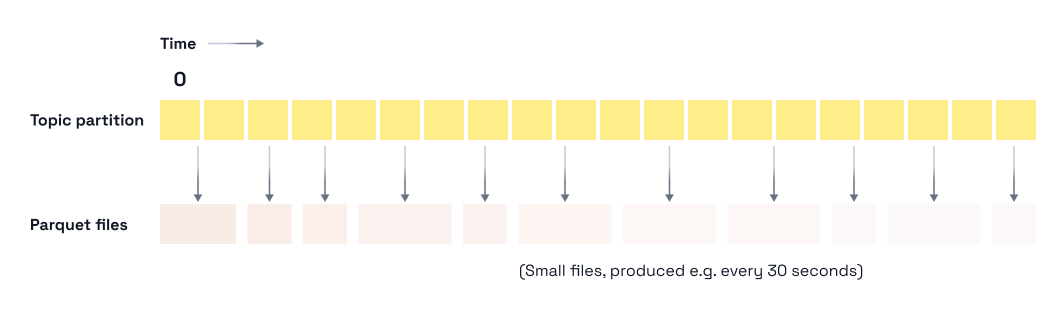
With bridge queries, the topic itself covers the freshness gap. Anything not yet written to Iceberg is read directly from the topic at query time. The flush no longer has to be frequent to keep Iceberg fresh, which means you can flush on whatever cadence is optimal for file layout instead.
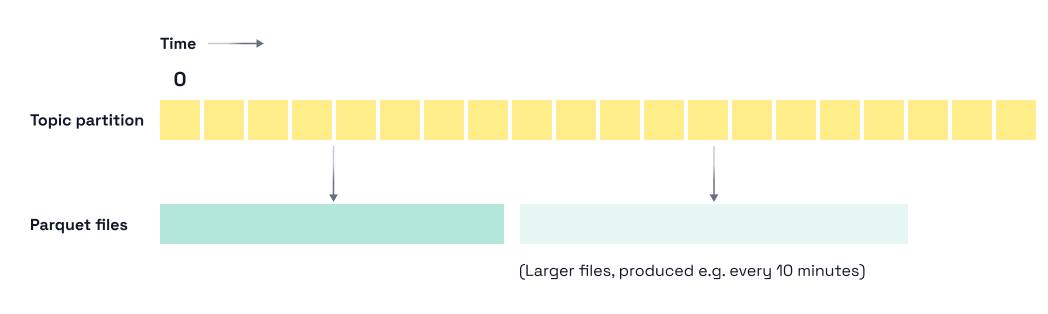
Flush every two hours or every six. Whatever produces the file sizes your analytics workload actually wants.
Let’s say your kid has 10,000 building bricks on the floor, and you need to move them to another room. Do you: A) move them one by one, or B) put them all in a big box first and carry that?
That, in essence, is why bigger Parquet files are better: they’re far more efficient. And, those efficiencies show up in lots of ways:
Going from 500KB files written every 30 seconds to 32MB files written a few times per hour is the kind of change that shows up directly in your query latency and your S3 bill.
Your query stays simple. Here's an example that reads the last month of order data — most (but not all) of which is in Iceberg:
SELECT user_id, COUNT(*) AS order_count
FROM default_redpanda_catalog=>orders
WHERE event_time > NOW() - INTERVAL '30 days'
GROUP BY user_id
ORDER BY order_count DESC
LIMIT 100;
There's no UNION, no client awareness of two storage tiers, no special syntax for "the recent stuff," just a single table. The bridge is invisible. You write the query you'd write against any table, and the engine routes the work to the right place.
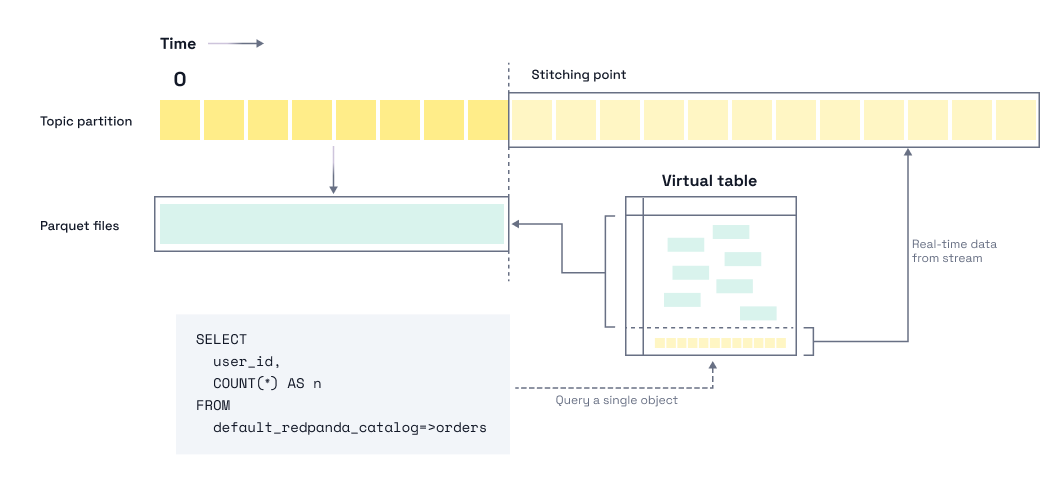
The real magic here is the stitching process; the Redpanda broker did the Iceberg conversion, so it has perfect clarity on what data is where (and when). This means the bridging process in Redpanda SQL is a simple concatenation of the sources; no deduplication is needed at the SQL layer. All the complications are hidden behind a simple, high-performance table abstraction.
There are two settings that work together to determine how the Redpanda broker will write parquet files to Iceberg:
1. You need to set a long lag target on the topic. This tells Redpanda it has more time before it needs to write topic data to Iceberg:
# Raise the lag target to 1 hour (default is 1 min)
rpk topic alter-config orders --set redpanda.iceberg.target.lag.ms=3600000
2. (Optional) For self-hosted clusters, you also have the option to raise the translator flush threshold for Iceberg Topics. This is the size at which the translator uploads accumulated data as a Parquet file:
# (Optional) Raise the size threshold to 64 MiB (default is 32 MiB)
rpk cluster config set datalake_translator_flush_bytes 67108864
The translator flushes when either threshold is hit, so both need to be sized for your topic's throughput. Rough rule of thumb: throughput × lag ≈ target file size. A topic doing 100 KiB/s with a 1-hour lag and a 64 MiB threshold will hit the size limit and produce nicely-sized files. The same topic with a 1-minute lag will produce small files no matter how high you set the flush threshold.
Note: While Iceberg Topics are available for most Redpanda Streaming deployments, Redpanda SQL will become available to self-managed Redpanda Enterprise deployments in late 2026 / early 2027.
Keep partition cardinality low. The default partition spec is (hour(redpanda.timestamp)), which already produces a minimum of one file per partition per hour. If you partition more finely — by minute, or by a high-cardinality field — you'll multiply the file count and undo the benefit of large flushes.
You can change the partition spec using rpk:
# Change the partition spec
rpk topic alter-config orders \
  --set redpanda.iceberg.partition.spec="(day(redpanda.timestamp))"
That's it. With these settings, you'll be producing analytics-friendly Parquet files on an hourly or daily cadence, with bridge queries covering the freshness gap.
Bridge queries dissolve a tradeoff that the streaming-to-lakehouse community has lived with for years:
If you've been running a compaction job at 3 AM just to undo what your streaming pipeline did during the day, this is for you.
To learn more about Redpanda SQL and take it for a spin yourself, here are some links to get you started.
Redpanda Shadowing now carries topic data, schemas, offsets, and ACLs on a single link for a low-risk, no-data-loss cutover

A database designed for agentic governance, now available on Google Cloud
Subscribe to our VIP (very important panda) mailing list to pounce on the latest blogs, surprise announcements, and community events!
Opt out anytime.