
Push-button migration from Confluent to Redpanda
Redpanda Shadowing now carries topic data, schemas, offsets, and ACLs on a single link for a low-risk, no-data-loss cutover

Boxes and arrows for people who move billions of events a day. No per-row invoice required.








Redpanda Connect can move data almost anywhere, with 300+ connectors, simple stream processing for individual messages, and all defined in a single tidy YAML file. That YAML is genuinely lovely once you get to know it. But sometimes, it's hard to make new friends.
A real pipeline is never three lines. It's "route this by region, enrich that with an HTTP lookup, cache the result so you're not hammering the API, catch the errors, log the ones that matter, and retry the rest." Written out, that's a graph cosplaying as a text file, and to change one branch safely, you have to hold the whole thing in your head. For anyone new to streaming, a blank connect.yaml is basically a brick wall, so we built a door.
In this post, we present the simplest way to compose Redpanda Connect pipelines using a visual composer.
The composer is a new drag-and-drop canvas for building Redpanda Connect pipelines. You wire up inputs, processors, and outputs as boxes and arrows, configure each one in place, and the pipeline takes shape in front of you instead of in your imagination.
And it handles the parts that actually make pipelines hard (not just the happy path). Here's what a real pipeline looks like in the composer:
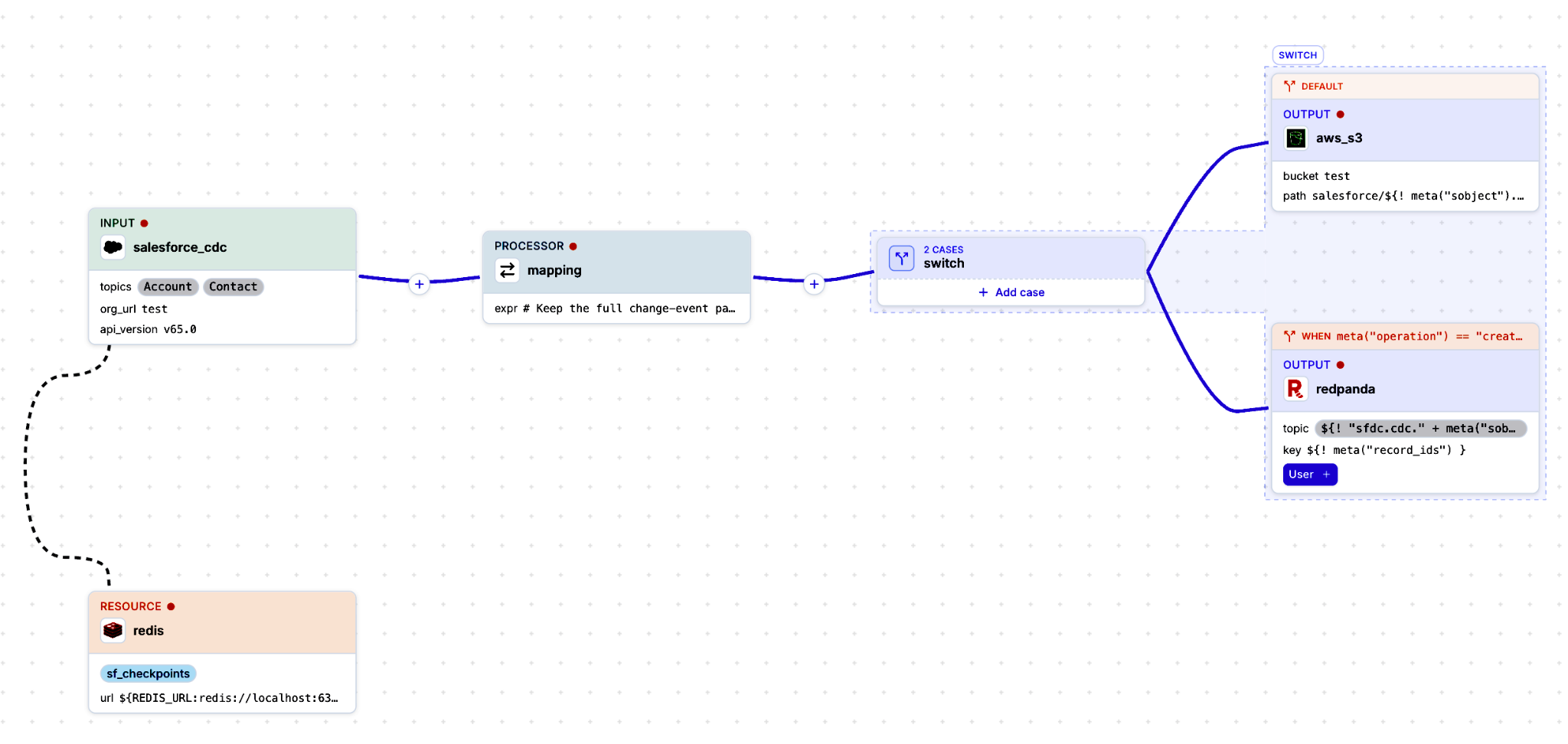
Here’s what’s happening:
WHEN this.region == "eu" and WHEN this.region == "us" —conditional routing you can see at a glance.https://eu.api/customers, with a cache processor (operator set) writing results into a memcached resource so repeat lookups stay cheap.It’s a non-trivial pipeline with routing, enrichment, caching, and graceful failure; all of which you can read without parsing a single line of config.
Although the point isn't that YAML goes away (it doesn't; the builder generates it). The point is that seeing the graph is faster than remembering it. New engineers ship their first pipeline in an afternoon instead of days of testing. And experienced engineers stop fat-fingering YAML indents at 2 am.
If you've used n8n, a workflow automation platform, this will feel familiar in the best way. It has the same "anyone on the team can wire this up" approachability, with boxes and arrows instead of a config-file cliff. The difference is what's underneath.
n8n is built for automating SaaS tasks: when a form is submitted, post to Slack, add a row. However, it’s not built to move billions of events a day with ordering, backpressure, and exactly-once semantics. The visual composer is the friendly front-end on an engine designed for exactly that kind of throughput.
Then there's Fivetran. Its pricing meters you by “monthly active rows,” where you pay per row that moves. That math is fine for a nightly sync of a few tables, but it gets uncomfortable fast when your "rows" are a firehose of streaming events. That’s because the bill scales with the exact thing a streaming platform is built to produce: volume, by the billion. Redpanda doesn't meter your pipelines by the row.
Moving more data is the job, not the surcharge.
Note for anyone with a long memory: yes, Benthos Studio was once the way to visualize a Benthos config, and yes, it's been gone for a while. The new composer is a Benthos Studio revival. It's a ground-up, purpose-built UI for Redpanda Connect. New architecture, new rendering, built for the pipelines people actually run today. Same idea, entirely new machine.
The visual composer is currently in preview, so expect a few rough edges and a growing feature set, which is exactly why we want you poking at it now.
Every one of those mapping boxes on the canvas is powered by Bloblang, Connect's data-mapping language (the bit that reshapes a message from what came in to what needs to go out). It's where most real customization lives, so it matters that it's fast to write and hard to get wrong.
Bloblang V2 (also in preview) is a ground-up redesign of that language. It runs as a parallel runtime alongside today’s Bloblang, driven by a formal spec, with stricter types, clearer error handling, and proper editor support: autocomplete as you type, plus a live playground where you can test a mapping against sample data. In short, you find out a mapping is wrong while you’re writing it, not when a real message hits it in production. It’s opt-in via a dedicated bloblang_v2 processor, and there’s an automated V1→V2 migration path that flags anything that behaves differently rather than silently rewriting it. So your existing pipelines keep running untouched.
Put the builder and V2 together, and the loop gets tight: drop a mapping node, get autocomplete and instant validation, see it wired into the graph. It’s fast and safe without leaving the canvas.
Redpanda Connect’s composer gets the applause, but the connectors are the ones doing the heavy lifting backstage: the unglamorous work of prying data out of the systems your business actually runs on and getting it into something that can act on it in real time. Here are a few recent highlights:
gcp_bigquery_write_api output (Connect v4.90.0) uses Google's Storage Write API for meaningfully higher throughput and lower latency than the legacy streaming API and load jobs, and it supports CDC-style upsert and delete write modes. This is the same kind of ingest optimization we did for the Snowflake Snowpipe Streaming output: go straight to the vendor's fastest ingest path instead of the general-purpose one. Your warehouse gets fresher data for less overhead.insert / upsert / delete, so a change-data-capture stream lands in your lakehouse the same way it hits the source database. (That means no four-service Debezium chain to babysit.) Check out our blog post on the full CDC semantics land in the Iceberg output.The ongoing theme here is that modernization rarely starts from scratch. It starts by getting data out of the system of record you already have and into something that can act on it now. That's the job Redpanda Connect keeps getting better at.
Want the full tour, including where the composer and Bloblang V2 go next? Prakhar Garg (Product Manager) and Ash Jeffs (our eccentric Technical Lead for Redpanda Connect) hosted a live product update: Redpanda Connect product update - what's new, what's next.
If you didn’t catch it live, good news: you can watch it whenever you want (for free)! Just click on the event below.
{{featured-event}}
Redpanda Shadowing now carries topic data, schemas, offsets, and ACLs on a single link for a low-risk, no-data-loss cutover

A database designed for agentic governance, now available on Google Cloud
Subscribe to our VIP (very important panda) mailing list to pounce on the latest blogs, surprise announcements, and community events!
Opt out anytime.