



.png)
Redpanda named a Leader in G2’s Fall 2026 Event Stream Processing Reports
Redpanda ranked #1 in implementation, usability, results, and relationship indexes


Redpanda Shadowing now carries topic data, schemas, offsets, and ACLs on a single link for a low-risk, no-data-loss cutover








TL;DR: Migrating off Confluent has meant MirrorMaker, custom scripts, and a big-bang cutover weekend. That stops in 26.2. Redpanda Shadowing now runs a live replica of your Confluent Cloud or Confluent Platform cluster (and any Apache Kafka® source), carrying topic data, schemas, offsets, and ACLs on a single link, so you can validate against real workloads first and then cut over one application at a time, on your own schedule. Available now in Redpanda Self-Managed 26.2 and Redpanda Cloud BYOC or Dedicated.
The IBM acquisition of Confluent closed in March 2026, prompting platform teams to reopen streaming vendor reviews and reevaluate long-term strategies, as most observers expect IBM to drive its data streaming roadmap towards a walled-garden, "pure IBM" approach rather than the independent modern middleware specialist Confluent had been.
What we hear from streaming data teams re-evaluating their stack is rarely "we're not sure Redpanda is better." It's "we know it is, but the migration looks risky, and we can't get it into the roadmap." That's a rational read.
Migrating off Confluent has historically meant standing up a separate replication stack with MirrorMaker (built on Kafka Connect), living with translated offsets, running a DIY Schema Registry migration on the side, and betting the business on a big-bang cutover weekend. It has too many moving parts, too much that can go wrong, so the project stalls and modernization gets deferred another quarter.
Redpanda Shadowing in 26.2 removes that risk. Shadowing is the in-broker, offset-preserving, full fidelity replication feature Redpanda customers already use for disaster recovery (DR), hardware migrations, and data syndication across cloud regions and data centers. In 26.2, the source cluster can also be Confluent Cloud, Confluent Platform, or any Kafka-compatible cluster using the open-source Schema Registry. The result is a self-paced, side-by-side migration that ensures all legacy Confluent applications don't miss a beat.
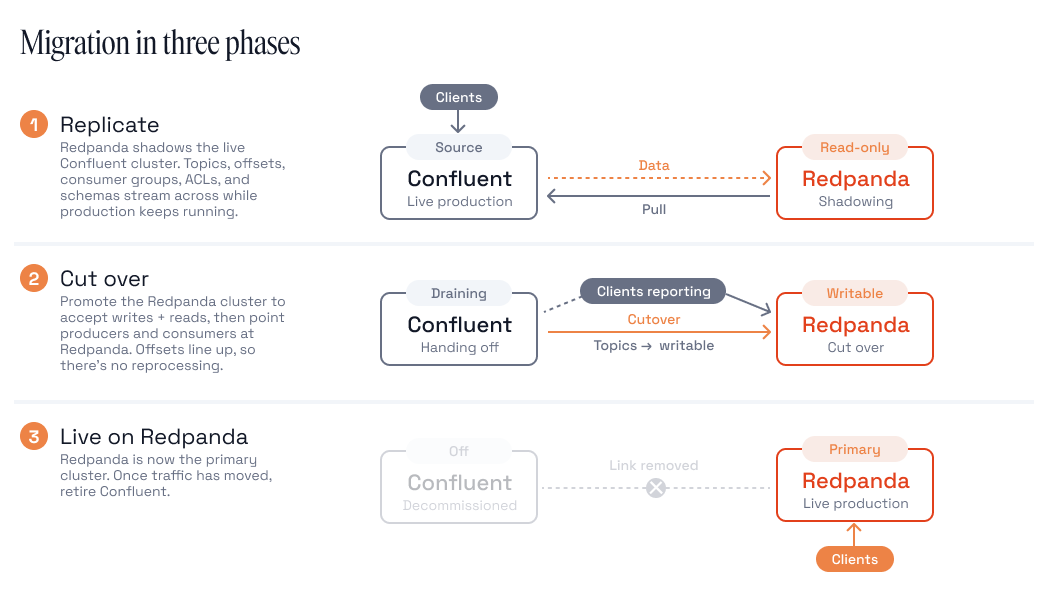
Topics get all the attention in a migration plan, and rightly so. They're where the data is, but the Schema Registry is usually what stalls the project. It's the last component anyone scopes, sitting between every producer and every consumer with application teams constantly evolving their shared data contracts, and it's the one piece where getting it wrong can break all your applications at once rather than just those using a particular topic.
Doing it by hand looked like this: dump every subject from the Confluent Schema Registry with a script. Replay them into the new registry preserving dependency order. Get a reference wrong, and the import fails. Reset compatibility settings per subject because they don't come free. Then reconcile IDs, because the wire format bakes a schema ID into every record, and your consumers will happily deserialize garbage if those IDs don't line up. Then do the whole thing again, because schemas kept changing while you were writing the script.
Redpanda Migrator in Redpanda Connect eased some of this, but it was still another deployment to stand up, secure, and babysit for the duration of the migration. For many teams running critical streaming infrastructure, a side-by-side, zero-downtime migration period (with a full app testing cycle in the middle) was enough overhead to push the project to "next quarter" indefinitely.
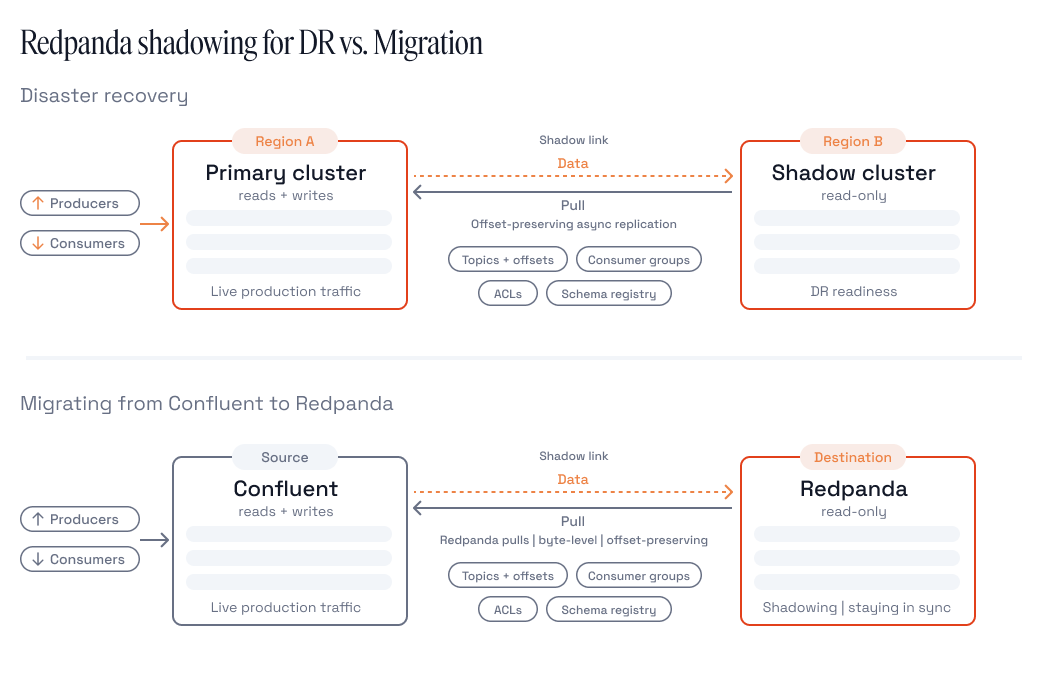
Schema replication already worked Redpanda-to-Redpanda in earlier releases, byte-for-byte, by shadowing the internal _schemas topic. What's new in 26.2 is API-mode Schema Registry replication. Instead of requiring a Redpanda source, the shadow cluster polls any registry that speaks the standard Schema Registry REST API (including Confluent and Kafka). Shadowing then imports all subjects, versions, and compatibility settings directly into Redpanda's built-in Schema Registry.
Under the hood, Shadowing is pull-based. Each broker in the shadow cluster runs replication tasks that fetch data from the source via the standard Kafka and Schema Registry APIs.One link now carries the whole migration: topic data on the Kafka side, schemas on the registry side, consumer offsets and ACLs alongside them. One config file, UI wizard, Kubernetes CRD, or Terraform module to fill out and automate. Take your pick.
The schema registry half of that config is about as boring as you'd hope:
schema_registry_sync_options:
  shadow_schema_registry_api:
    source_url: https://psrc-xxxxx.us-east-1.aws.confluent.cloud
    auth_options:
      basic:
        username: <sr-api-key>
        password: <sr-api-secret>
    tls_settings:
      enabled: true
    tail_interval: 10s          # incremental changes
    full_sync_interval: 5m      # full source scan, catches anything missed
    unsupported_schema_feature_policy: FAIL
Here, two sync cycles keep the registries in step. Tail syncs run every 10 seconds by default and pick up incremental changes. Full syncs scan all selected subjects every five minutes and catch anything a tail sync missed. There's a configurable request rate limit (max_source_requests_per_second, default 30) so you're not hammering the source registry too hard, which matters more than you'd think when the source is a Confluent Cloud registry you're metered on.
A few properties that make this powerful rather than merely possible:
FAIL (the default) skips that schema and reports the error; REMOVE strips the unsupported fields and imports the rest without tripping up the migration. Either way, you find out during a sync you're watching, not during a cutover you can't stop.In Redpanda Cloud, you can also manage failover directly from the Shadow Link page in Cloud Console or the Data Plane API.
Even more powerful, Shadow Links can be failed over one topic at a time. So the migration becomes a sequence of small, boring cutovers end users never notice. Pick the lowest-risk application, fail over its topics, point its producers and consumers at Redpanda, watch it for a week, move on.
Consumer group offsets are already replicated, so consumers resume where they left off, rather than resetting to the beginning of their partitions for a full replay. ACLs are already in place, so you're not tweaking an authorization policy at 2 AM.
The single-cluster demo is the easy case. Real, mature Confluent / Kafka deployments tend to look like a decade of organizational history: one registry per environment, business unit, acquisition, or IT fiefdom, with overlapping subject names and per-subject compatibility policies nobody remembers setting. Sometimes those clusters share a common registry. That means you’ll need options.
Redpanda's Schema Registry supports contexts: independent namespaces for subjects within a single registry, each with its own schema ID counter, mode, and compatibility settings. The implementation is compatible with Confluent's Contexts API, so if your tooling already uses contexts, it keeps working. Contexts are enabled by default in 26.2, and on BYOC and Dedicated clusters in Redpanda Cloud.
That gives you real control over exactly how a migration lands:
source_filter selects specific contexts, specific subjects, or a union of both, using qualified subject syntax (:.staging:orders-value). You don't have to migrate everything at once to start.identity destination mapping keeps source context names, the normal choice for a straight migration. exact mapping lets you rename contexts on the way in, which is how you consolidate several source registries into one Redpanda cluster without collisions: each source registry lands in its own destination context.There's a second use for the same mechanism, and it's the one risk-averse teams start with.
Point a Redpanda shadow cluster at your Confluent or Kafka deployment and leave it there. Topics, offsets, ACLs, and schemas replicate continuously. You now have a warm standby on a different platform, in a different failure domain, with a different support relationship, usually at much lower cost than a second Confluent cluster. This creates a stepping stone to a future Redpanda migration, and adds resilience to your mission-critical data streaming estate.
Some teams run this configuration for a quarter or more before cutting over anything. It's a legitimate destination in its own right (Redpanda as the DR cluster for a Confluent or Kafka primary) and the most honest way to evaluate a migration, because the shadow cluster carries your real production schemas and data the whole time. Synthetic workloads can also run on Redpanda during the migration, acting as a staging cluster of sorts and further building confidence.
Seeing is believing, so we built a hands-on lab that runs a real Confluent Platform stack (Confluent Kafka in KRaft mode plus a Confluent Schema Registry) as the migration source, and replicates everything to a Redpanda shadow cluster. It runs in Docker Compose and takes only 20 minutes to complete.
The lab deliberately doesn't stick to the easiest use case. It registers two plain Avro subjects (orders-value, customers-value), sets BACKWARD compatibility mode on one and adds a second, compatible version, then piles on the wrinkles that often break hand-rolled migrations:
Then, it produces real Avro-encoded records to the Confluent cluster, and consumes them back twice: once resolving schemas against the Confluent registry, and once against the Redpanda shadow cluster's registry (a switch that requires just a single config change in the app). The records decode identically, both times. That's the whole test, which you can easily repeat in your Confluent environment with your applications and schemas.
The lab also verifies that the shadow cluster’s registry remains “locked” before failover, preventing corruption of the replica, and deploys Redpanda Console on the shadow cluster so you can browse the replicated schemas and data or tweak link settings and data in a UI.
If a stalled Schema Registry migration is the only thing standing between you and cutting over, this lab will show you it isn't anymore. Find it in Redpanda Labs.
Shadowing and API-mode schema replication are enterprise features and require either a Redpanda Enterprise license or a Redpanda Cloud/BYOC trial. You can generate a trial key to run the lab locally and evaluate against your own registry.
Many platform teams have wanted to modernize their Kafka estate and/or escape Confluent’s grip for a while, but have been waiting for the migration story to become less painful. That's what we solved in 26.2. And it’s available now in Redpanda Self-Managed and Redpanda Cloud (BYOC and Dedicated clusters).
Redpanda Shadowing now migrates you off Confluent or Kafka the same way it protects you from outages: smoothly, with a live, offset-preserving replica of your cluster. Simply sync and validate your data, schemas, security policies, and full apps, then cut over in one coordinated switch. No MirrorMaker, custom scripts, multiple tools, or big-bang weekend migration. Your apps will barely notice they moved.
Redpanda ranked #1 in implementation, usability, results, and relationship indexes
Redpanda Operator 26.2 delivers simpler multi-region replication, safer rolling restarts, and deepens K8s support

Everyone is building agents. The Out-of-Band Policy Engine (OBPE) is how you govern them
Subscribe to our VIP (very important panda) mailing list to pounce on the latest blogs, surprise announcements, and community events!
Opt out anytime.