



.png)
Redpanda named a Leader in G2’s Fall 2026 Event Stream Processing Reports
Redpanda ranked #1 in implementation, usability, results, and relationship indexes


Redpanda Operator 26.2 delivers simpler multi-region replication, safer rolling restarts, and deepens K8s support








The TL;DR
Redpanda Operator v26.2 introduces Stretch Clusters: a single logical Redpanda cluster distributed across multiple Kubernetes (K8s) clusters for multi-region high availability. The release also enables Redpanda Connect pipelines to run as K8s resources, safer rolling restarts, and adds Gateway API support for Redpanda Console.
Redpanda Operator 26.2 delivers greater resilience and robustness for mission-critical data pipelines: the kind that push multiple gigabits per second of throughput and span multiple geographic regions. It hardens Redpanda on Kubernetes along two axes at once: the deployment architectures you can run safely and the day-2 maintenance you perform on them.
On the architecture side, Stretch Clusters go GA, letting you run a single logical Redpanda cluster across multiple Kubernetes clusters. A Stretch Cluster gives Apache Kafka® workloads synchronous multi-region replication: it fails over automatically through Raft consensus, you manage it as a single unit, and existing Kafka clients and applications work with it unchanged through Redpanda's Kafka-compatible API.
On the maintenance side, new per-broker restart probes make rolling restarts respect the cluster's actual replication state instead of a coarse cluster-wide guess, so a broker only restarts once it's safe to do so.
Redpanda Operator 26.2 also broadens what the operator manages and how it plugs into the wider Kubernetes ecosystem:
Stretch Clusters and Redpanda Connect pipelines are both Enterprise features; the Gateway API integration and the new restart probes are available to everyone.
In this post, we'll walk through each feature, explain the problem it solves, and give you copy-pasteable manifests to try them yourself.
A Redpanda Stretch Cluster is a single logical Redpanda cluster whose brokers span multiple Kubernetes clusters. Typically one per availability zone, region, or even cloud provider. Because Redpanda replicates each partition with Raft, and Raft only acknowledges a write once a majority of replicas have it durably, a stretch cluster gives you:
This is fundamentally different from async replication or mirroring, which copies data after the fact and always leaves a window of potential loss.
Redpanda Operator 26.2 introduces two CRDs in the cluster.redpanda.com/v1alpha2 API group:
Each pool references the parent StretchCluster and carries region-specific overrides: replica count, external access, TLS, scheduling, and storage.
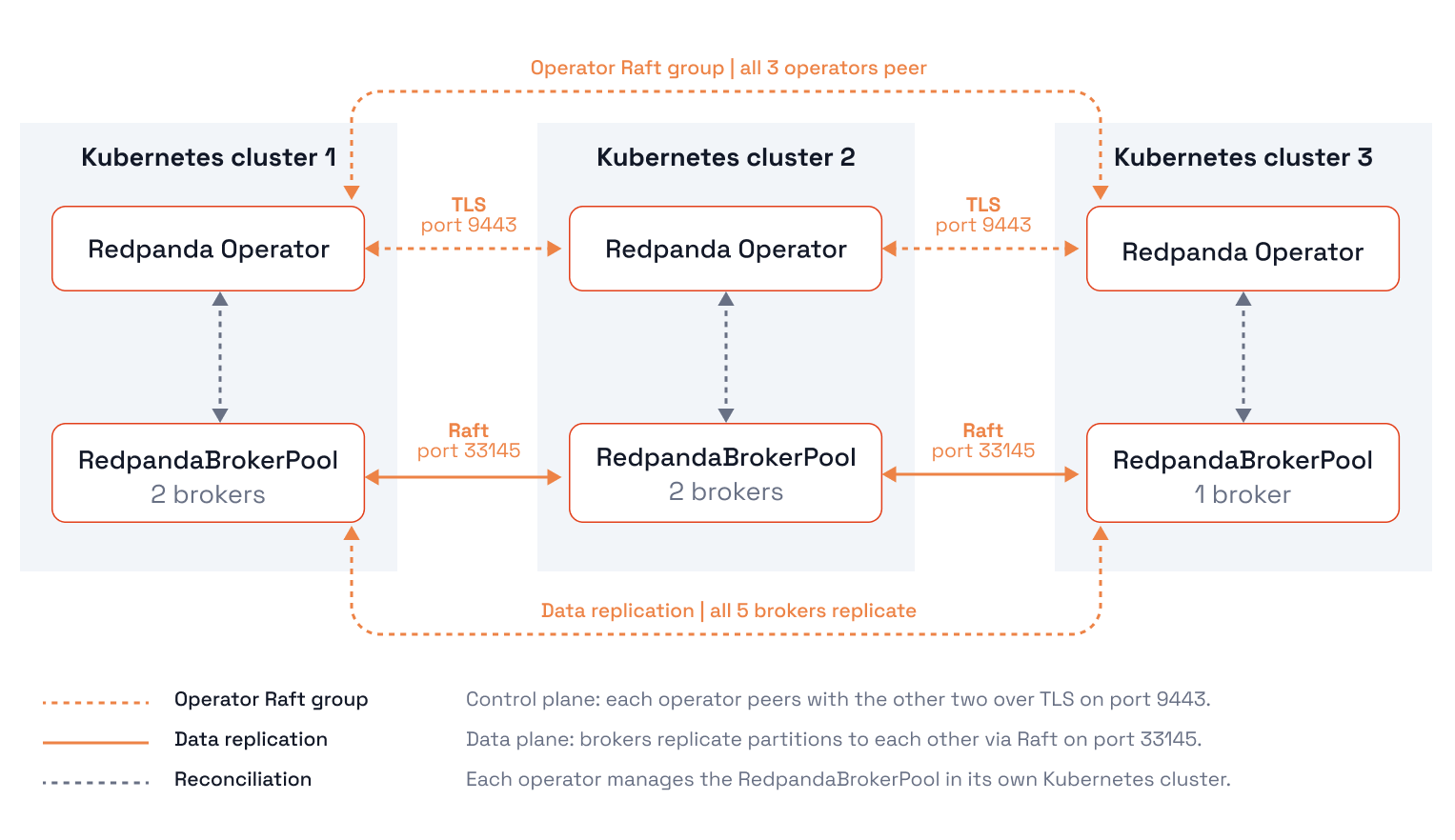
First, define the cluster-wide spec once:
apiVersion: cluster.redpanda.com/v1alpha2
kind: StretchCluster
metadata:
  name: cluster
  namespace: redpanda
spec:
  # Shared PVC settings. Pools inherit these by default and can override
  # individual keys (storage overrides must be set at creation time —
  # volumeClaimTemplates on the rendered StatefulSet are immutable).
  storage:
    persistentVolume:
      enabled: true
      annotations:
        team: platform
        env: prod
Then attach one RedpandaBrokerPool per member cluster. Here's a pool for the first region, with TLS and per-listener certs:
apiVersion: cluster.redpanda.com/v1alpha2
kind: RedpandaBrokerPool
metadata:
  name: pool-region-a
  namespace: redpanda
spec:
  clusterRef:
    group: cluster.redpanda.com
    kind: StretchCluster
    name: cluster
  replicas: 1
  image:
    repository: redpandadata/redpanda
    tag: v25.2.1
  rbac:
    enabled: true
    rpkDebugBundle: true
  tls:
    enabled: true
    certs:
      issuer-managed:
        caEnabled: true
        applyInternalDNSNames: true
        issuerRef:
          name: custom-issuer-managed-issuer
          kind: Issuer
          group: cert-manager.io
      user-provided:
        caEnabled: true
        secretRef:
          name: cluster-user-provided-cert
  listeners:
    kafka:
      tls:
        cert: user-provided
    admin:
      tls:
        cert: issuer-managed
    http:
      tls:
        cert: issuer-managed
    schemaRegistry:
      tls:
        cert: issuer-managed
    rpc:
      tls:
        cert: issuer-managed
  services:
    perPod:
      remote:
        enabled: false
Repeat the RedpandaBrokerPool for pool-region-b and pool-region-c, pointing each at the same clusterRef. The operator stitches the pools into one cluster and keeps a consistent broker list across all member clusters. The result: a cluster that survives the loss of an entire region — or an entire cloud — without losing a single acknowledged record.
Connectors and stream processors have always been the awkward neighbor of a Kubernetes-native Redpanda deployment, usually involving a separate deployment, ConfigMap, and a pile of glue. 26.2 introduces a first-class Pipeline CRD (beta) that lets you manage Redpanda Connect pipelines the same way you manage clusters and topics: declaratively, with the operator handling rollout, scaling, and credential wiring.
A Pipeline is just your Connect config plus a binding to a Redpanda cluster. The operator injects broker addresses, TLS, and SASL credentials into the redpanda input/output plugins for you, so you never hardcode connection details.
Bind to an existing Redpanda cluster with cluster.clusterRef. The operator merges connection details in. Note the ${RPK_BROKERS} / ${RPK_TLS_*} variables, which the operator populates:
apiVersion: cluster.redpanda.com/v1alpha2
kind: Pipeline
metadata:
  name: producer-pipeline
spec:
  replicas: 2
  cluster:
    clusterRef:
      name: my-redpanda      # an existing Redpanda CR
  configYaml: |
    input:
      generate:
        interval: "1s"
        mapping: 'root.message = "hello from pipeline"'
    output:
      redpanda:
        seed_brokers:
          - "${RPK_BROKERS}"
        tls:
          enabled: ${RPK_TLS_ENABLED}
          root_cas_file: "${RPK_TLS_ROOT_CAS_FILE}"
        topic: "pipeline-topic"
  resources:
    requests:
      cpu: 500m
      memory: 512Mi
    limits:
      cpu: "1"
      memory: 1Gi
The Pipeline resource also supports:
userRef: bind to a User CR for SASL auth.
serviceAccountName per-pipeline cloud IAM for IRSA / Workload Identity / Pod Identity)
valueSources: project values from Secrets/ConfigMaps into ${ENV} variables, and paused: true to scale a pipeline to zero without deleting it.
Status conditions (ConfigValid, ClusterRef, Ready) tell you exactly where a pipeline is in its lifecycle.
Connect pipelines aren't one-size-fits-all: a lightweight CDC tail and a memory-hungry windowed aggregation want very different machines. The Pipeline spec exposes the standard Kubernetes scheduling controls—nodeSelector, tolerations, topologySpreadConstraints, and zones.
This means you can pin each pipeline to the node pool whose shape matches the resources that pipeline needs. Pair a nodeSelector (matching your cloud's node-pool label) with resource requests/limits and a disruption budget, and a CPU-bound pipeline lands on compute-optimized nodes while a stateful, memory-heavy one lands on a memory-optimized pool:
apiVersion: cluster.redpanda.com/v1alpha2
kind: Pipeline
metadata:
  name: heavy-aggregation
spec:
  replicas: 3
  cluster:
    clusterRef:
      name: my-redpanda
  configYaml: |
    input:
      redpanda:
        seed_brokers:
          - "${RPK_BROKERS}"
        topics: ["events"]
        consumer_group: "agg"
    output:
      redpanda:
        seed_brokers:
          - "${RPK_BROKERS}"
        topic: "events-aggregated"
  resources:
    requests:
      cpu: "2"
      memory: 8Gi
    limits:
      memory: 16Gi
  # Land this pipeline on a memory-optimized node pool.
  nodeSelector:
    cloud.google.com/gke-nodepool: connect-memory-optimized
  tolerations:
    - key: workload-type
      operator: Equal
      value: connect
      effect: NoSchedule
  zones:
    - us-east-1a
    - us-east-1b
  budget:
maxUnavailable: 1Beta and licensing note: The Pipeline API surface may change before GA. We'd love your feedback while it's in beta! Tell us in the Redpanda Community on Slack.
Every Kubernetes operator eventually has to restart pods for upgrades, config changes, or node maintenance. The danger is doing it too eagerly. Previously, the operator gated restarts on a cluster-wide health check, which left two windows open for trouble:
acks=1 producers could lose data.Redpanda Operator 26.2 fixes this with per-broker probes sourced from Redpanda Core:
Pre-restart probe (/v1/broker/pre_restart_probe): before touching a broker, the operator asks Core whether this specific broker is safe to restart. Core checks the broker's actual partition leadership and replication state for three dangerous conditions: acks=1 data-loss risk, produce/consume unavailability from leaderless partitions, and acks=-1 produce rejection from losing quorum. RF=1 partitions are treated as acceptable (no redundancy by design).
Post-restart probe (/v1/broker/post_restart_probe): after a broker comes back, the operator waits until it reports that it has reclaimed its in-sync replicas before proceeding to the next pod. By default it waits for 100% recovery; this is tunable via --post-restart-caught-up-percent for teams with specific recovery-time SLAs.
It's automatic (nothing to configure), and it gracefully falls back to the old cluster-wide health check on Redpanda versions that don't expose these probes. The operator also fails closed, which means if a probe errors unexpectedly, the roll is deferred rather than barreling ahead. The net effect is that upgrades and restarts respect the cluster's actual replication state, one broker at a time.
Ingress was never a great fit for the Kafka protocol. It's HTTP-centric, and Kafka clients need to reconnect to specific brokers by hostname. The Kubernetes Gateway API is a much better model where an infrastructure team runs a Gateway, and Redpanda attaches routes to it.
26.2 adds Gateway API support for external access on two fronts: Console routing via HTTPRoute is GA, and Kafka routing via TLSRoute is in beta.
The chart can create a bootstrap TLSRoute plus one per-broker TLSRoute, routed by SNI through a Gateway you manage. (The chart deliberately does not create the Gateway itself. That's the infra team's job, so you reference it via parentRefs.)
Enable it in your Helm values:
external:
  gateway:
    # Activates Gateway API TLSRoute mode. Takes precedence over external.type.
    enabled: true
    # Gateway(s) that handle the TLSRoutes (passed into each TLSRoute's parentRefs).
    parentRefs:
      - name: redpanda-gateway
        sectionName: kafka
    # Port advertised to clients in broker metadata (the Gateway does the listening).
    advertisedPort: 9094

listeners:
  kafka:
    external:
      default:
        # Route this listener via Gateway API instead of NodePort/LoadBalancer.
        type: tlsroute
        # SNI hostname for the bootstrap route.
        host: redpanda.example.com
        # Per-broker SNI hostnames. The broker advertises this same hostname,
        # so the SNI the client reconnects on matches what the Gateway routes by.
        hostTemplate: redpanda-$POD_ORDINAL-broker.example.com
Because it's opt-in per listener, you can move Kafka to a TLSRoute while leaving Admin or Schema Registry on a conventional NodePort/LoadBalancer, enabling a gradual migration. Here's roughly what the bootstrap TLSRoute looks like:
apiVersion: gateway.networking.k8s.io/v1alpha2
kind: TLSRoute
metadata:
  name: redpanda-kafka-default-bootstrap
spec:
  parentRefs:
    - name: redpanda-gateway
      sectionName: kafka
  hostnames:
    - redpanda.example.com
  rules:
    - backendRefs:
        - name: redpanda-gateway-bootstrap
port: 9094Redpanda Console speaks HTTP, so it maps cleanly onto an HTTPRoute. But you don't hand-write the route; you declare a gateway stanza on the Console custom resource (or the matching gateway block in the Console Helm values), and the operator renders and reconciles the HTTPRoute for you, attaching it to the Gateway you reference:
apiVersion: cluster.redpanda.com/v1alpha2
kind: Console
metadata:
  name: my-console
  namespace: redpanda
spec:
  clusterSource:
    clusterRef:
      name: my-redpanda
  gateway:
    enabled: true
    parentRefs:
      - name: my-gateway
        namespace: gateway-system
        sectionName: https
    hostnames:
      - console.example.com
    path: /
    pathType: PathPrefix
The same interface is available directly in the Console Helm chart for non-operator installs:
# console values.yaml
gateway:
  enabled: true
  parentRefs:
    - name: my-gateway
      namespace: gateway-system
      sectionName: https
  hostnames:
    - console.example.com
  path: /
  pathType: PathPrefix
A few things worth knowing:
Gateway API CRDs are a prerequisite. They aren't bundled with the Redpanda or Console charts. Install them (and a Gateway controller like Envoy Gateway, Istio, Cilium, or NGINX Gateway Fabric) first:
kubectl apply -f https://github.com/kubernetes-sigs/gateway-api/releases/download/v1.5.1/standard-install.yamlGateway and ingress listeners are mutually exclusive. Enabling both fails fast, as ingress and gateway cannot both be enabled, so you have to use one or the other. Switching between them is a clean swap, just remove the gateway stanza, add ingress, and the operator deletes the HTTPRoute and creates an Ingress instead.
With Kafka attached via TLSRoute and Console via HTTPRoute on the same Gateway, a single piece of edge infrastructure fronts your entire Redpanda deployment (Kafka by SNI, Console by hostname/path) using the same role-oriented API the rest of your platform is standardizing on.
Redpanda Operator 26.2 removes friction from running Redpanda on Kubernetes, without compromising resilience. It also deepens support across both the Redpanda and Kubernetes ecosystems. Here’s a summary of what’s available:
What’s next:
Happy streaming!
Redpanda ranked #1 in implementation, usability, results, and relationship indexes

Redpanda Shadowing now carries topic data, schemas, offsets, and ACLs on a single link for a low-risk, no-data-loss cutover

Everyone is building agents. The Out-of-Band Policy Engine (OBPE) is how you govern them
Subscribe to our VIP (very important panda) mailing list to pounce on the latest blogs, surprise announcements, and community events!
Opt out anytime.