



How we built an AI assistant for an enterprise IT service desk
Automating IT service desk triage with a governed AI agent in Microsoft Teams

How to use tags and Cedar policies to give each team a self-service boundary


A lot of the focus on Redpanda Agentic Data Plane is on governing the agents themselves, with data policies and guardrails. But what about governing the platform itself, so your whole enterprise can use it as the central place to run agents? This post shows how multiple teams can share one deployment, with a flexible boundary around each team that covers every type of resource on the platform.
Those boundaries have to keep teams moving, not slow them down, because the north star is self-service: a team should be able to build and release its own agents without filing a ticket to the platform team. Self-service means something different at every enterprise, so the access model needs to flex to fit. Skip that flexibility, and users find other ways to run their agents, undermining the security and governance the platform is supposed to bring.
That goal translates into three requirements:
The approach is simple: policies can read any tag you put on a resource, so you decide which facts about a resource control access to it. This post shows one way to do that, a team tag for who owns each resource, a stage tag for whether an agent is released, a persona tag for what each team needs to do, and a small set of policies that read those tags. We’ll walk through how the authorization model meets the three requirements above, then cover the decisions you need to make before writing a policy.
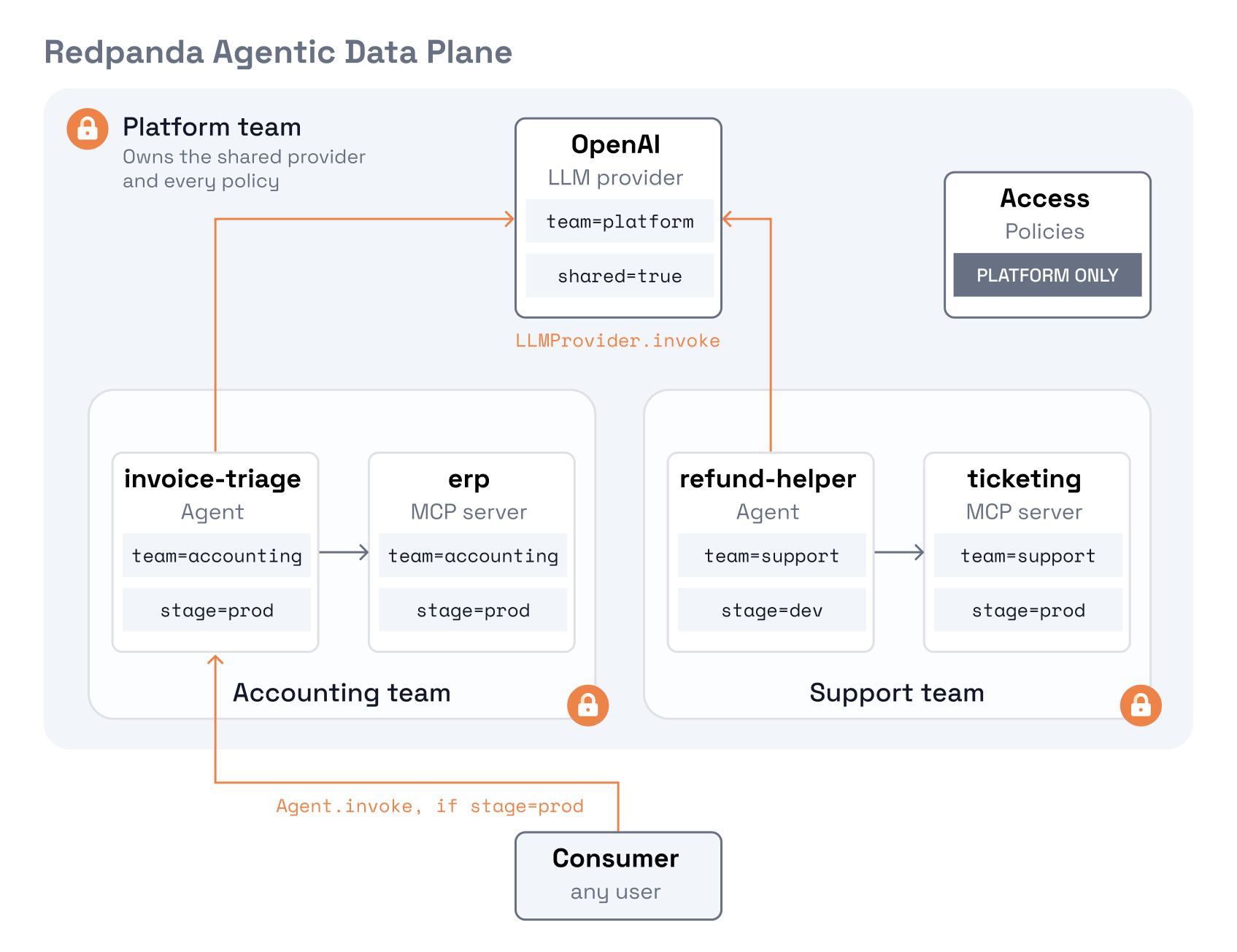
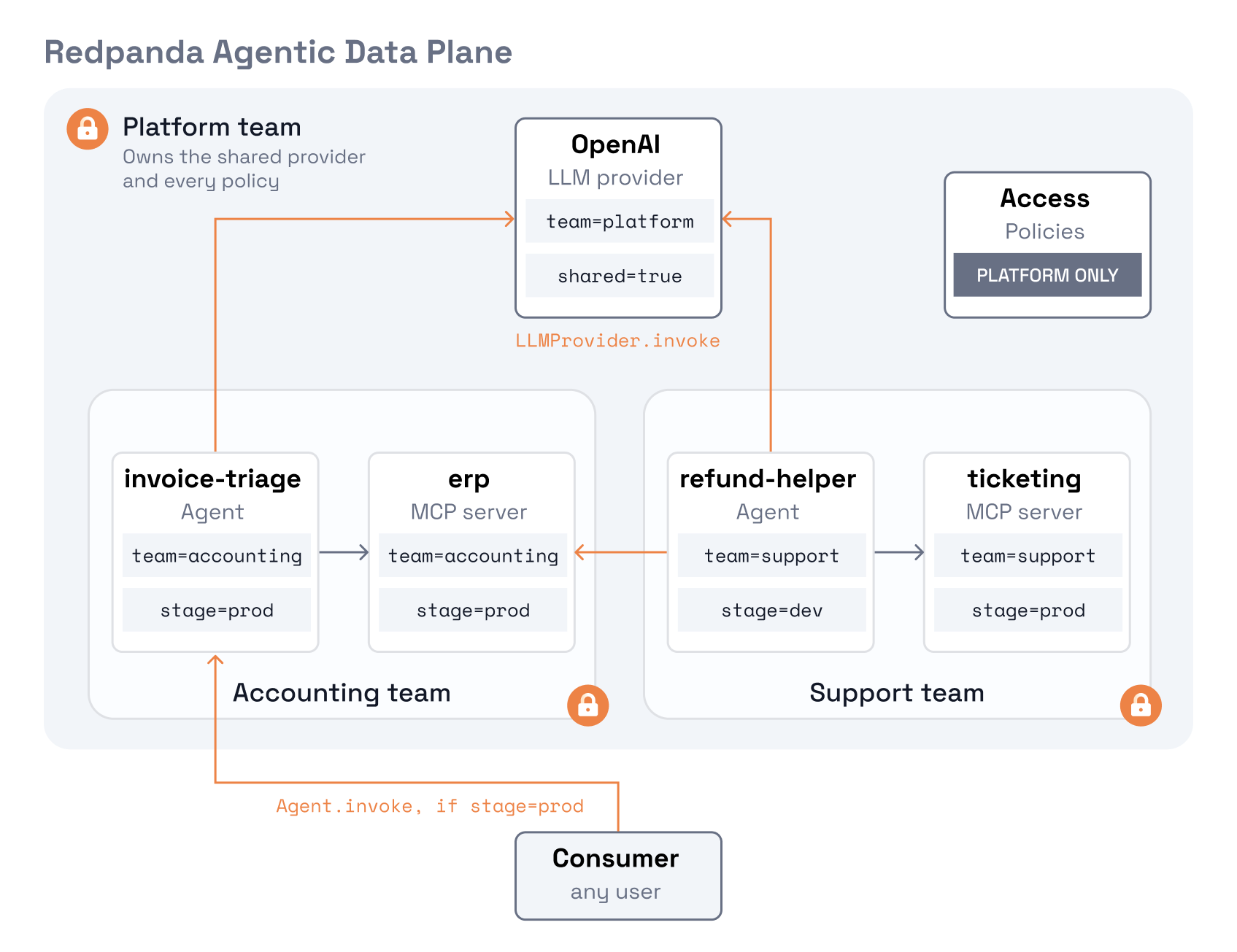
To make this concrete, we’ll use an example with three teams. The platform team runs the deployment and owns a shared large language model (LLM) provider. The accounting team builds an invoice-triage agent that reaches its enterprise resource planning (ERP) system through a Model Context Protocol (MCP) server named erp. The support team builds a refund-helper agent on its own ticketing MCP server. We’ll show the finished model, and how it changes when a team needs its own provider or access to another team’s server.
Redpanda Agentic Data Plane is built on an attribute-based access control (ABAC) model. You tag each resource with a few attributes, and you write policies in the Cedar policy language that read those tags when a request comes in. A policy that says "the accounting team may invoke agents tagged team=accounting" covers every agent with that tag, including the ones that don't exist yet.
A Cedar policy is a permit or forbid statement with three required parts and an optional fourth:
Agent.invoke or McpServer.create.when clause for the rule and an unless clause for exemptions.Two evaluation rules apply everywhere:
permit matches it.forbid overrides every permit.Here's what a policy looks like. This is the policy that gives the accounting team control of its own agents:
// accounting-agents
permit (
  principal in Group::"accounting",
  action in [Action::"Agent.create", Action::"Agent.get", Action::"Agent.list",
             Action::"Agent.invoke", Action::"Agent.update"],
  resource is Agent
) when {
  resource.hasTag("team") &&
  resource.getTag("team") == "accounting"
};
Translating the policy into words:
accounting.Agent type.team=accounting. The hasTag check comes first because reading a tag the resource doesn't have is an evaluation error in Cedar, not false.On a create or update, the condition is checked against the resource as it will exist after the call. An accounting user who tries to create an agent tagged team=support, or with no team tag at all, is denied. The policy enforces the tagging rule without anyone checking. One case needs an extra policy, covered with the forbids later in the post.
Every request in Redpanda Agentic Data Plane is authorized against access policies like the one above. The resources those policies govern:
All of these carry tags, and tags are what the policies read. The example model in this post uses agents, MCP servers, LLM providers, and access policies. Secrets, guardrails, and budgets take tags the same way, so the approach extends to them when you need it. The decisions below are about which rows each team needs, and which actions on each.
The access model starts with a question about people rather than about Cedar. For each team that will use the platform, you need to decide what they need to be able to do, map that to the resource types above, and then express it with tags.
These are the questions you'll need to think about as you build out your access model. Since the access model is flexible, there's no single right answer.
Redpanda Agentic Data Plane reads group membership from your IdP at request time, which makes the IdP the one place team membership is managed. When someone joins accounting, they’re added to the group and their access follows automatically.
This means that your team tag values should be your IdP group names, spelled exactly as the IdP emits them. A policy compares strings, so Accounting and accounting are two different teams.
A resource carries one team tag. A person can be in several groups, and gets the permits of all of them. Someone in both accounting and support can build and release for either team, which is usually what you want for a shared engineer but it’s worth knowing before you put someone in a second group
In our example, the team tag has three possible values: platform, accounting, and support; one for each IdP group.
The team tag draws the boundaries between teams. Any other fact about a resource that a policy should react to can be a tag too. Our model uses two more.
shared=true marks a resource that every team may use. The platform team puts it on the LLM provider, and one policy permits get, list, and invoke on any provider carrying it, for everyone. When the platform team adds a second shared provider, it tags it and the same policy covers it.
stage carries the release lifecycle. Every agent is either dev or prod. In dev, only the person who created the agent can invoke it. That takes one forbid with an exemption for the creator, which Redpanda Agentic Data Plane exposes to policies as created_by. The restriction applies to the creator's own teammates too, so a dev agent stays private to its builder until it's released. In prod, everyone can invoke it.
Releasing an agent means changing the tag value from dev to prod. Anyone on the owning team can do that without asking the platform team to change a policy. If you want a review step before release, a forbid on changing the stage tag can reserve that change for a reviewer group. The team tag works the other way. Teams can’t change it, because a forbid reserves that change for the platform team. The forbids section below explains why.
Start from personas, not teams. A persona is a kind of user, defined by what it needs to do. Identify the personas your platform has, describe what each needs using Redpanda Agentic Data Plane’s action reference as the vocabulary, then map each team to one. Our example model has three:
The platform team maps to Operator, and accounting and support both map to Builder. Consumer covers everyone, including people in no team group, so it needs no team of its own. A team that only uses agents other teams built needs no team policies at all.
Each Builder team gets one policy per resource type it uses: one for its agents, one for its MCP servers, and one for the tools on those servers. Tools get their own policy because they’re a sub-resource. An MCP server is the resource a team creates and connects to, and the tools it exposes sit underneath it. A policy on the server covers creating it, connecting to it, and listing its tools, but calling a tool is an action on the tool itself.
All three policies read the team tag, so a team with three agents and five MCP servers gets the same three policies as a team with one of each. Giving a team access to another resource type, such as secrets or budgets, adds one policy for that type.
The diagram below shows the resulting model. Each team’s resources sit inside its own boundary, and the shared provider and the access policies sit with the platform team. The only lines crossing a boundary are the calls the policies allow.
No, and the model shouldn't force it. Teams that start on the same persona can drift apart, and when they do, their policy sets drift with them.
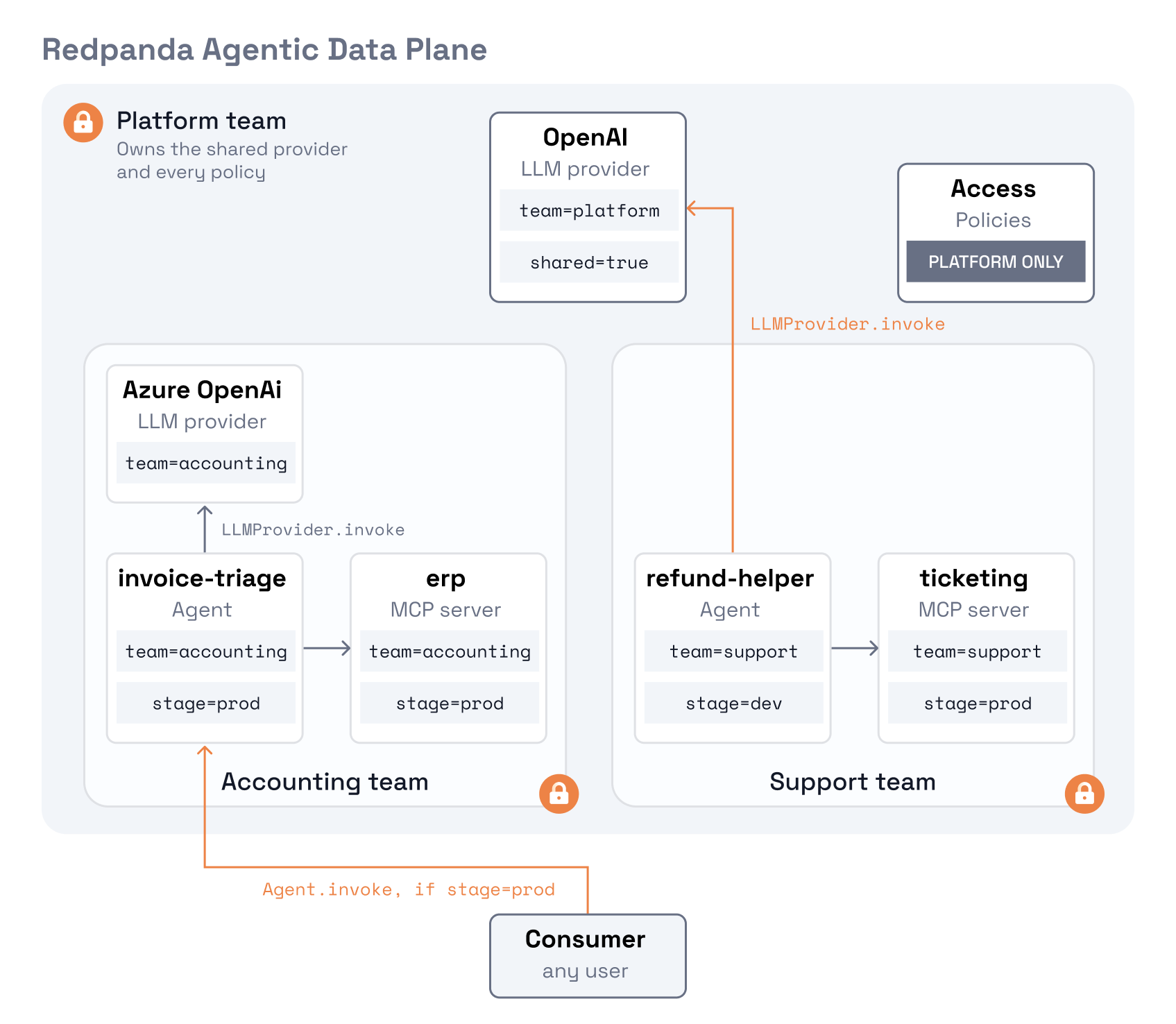
A team that handles regulated data, such as accounting, might want its own LLM provider under its own contract instead of the shared one. At that point accounting becomes a different kind of builder. Support is still a builder on the shared provider. Accounting is now a builder with a private provider, tagged team=accounting, that only it can use. The two personas need different policy sets: accounting's adds a policy for its own provider, and support's stays as it was.
What if a team's agent needs data from another team's system? That's a request to the platform team, because access across team boundaries is the platform team's call. They would write one policy that permits the support group to call tools on the accounting team's ERP server.
Once an agent is in prod, any user should be able to find it and run it. That means get, list, and invoke on agents tagged stage=prod, for every principal.
// all-prod-invoke
permit (
  principal,
  action in [Action::"Agent.get", Action::"Agent.list", Action::"Agent.invoke"],
  resource is Agent
) when {
  resource.hasTag("stage") &&
  resource.getTag("stage") == "prod"
};
Update isn’t in the list, so everyone can use a released agent but only its team can change it.
Three forbids hold the model together:
all-dev-creator-only denies invoking any agent tagged stage=dev, unless you created it.forbid denies invoking any agent missing stage or team, so an agent someone forgot to tag is unusable instead of slipping past the dev and prod rules.forbid a creator could move their own agent to another team. A forbid on changing the team tag closes that for everyone except the platform team:// all-teams-cannot-change-team-tag
forbid (
principal,
action,
resource
) when {
resource has changed_tags && resource.changed_tags.contains("team")
} unless {
principal in Group::"platform"
};
changed_tags is the set of tag keys an update adds, removes, or changes. It exists only on the update path, so creates and reads are untouched. The exemption names the platform team instead of listing every builder team, so a new team is covered without editing this policy.
Access policy management doesn't need a forbid. A request is denied unless a permit matches it, and platform-full-access is the only policy that grants Policy.create, Policy.update, or Policy.delete.
You will need twelve access policies to produce the model in Diagram 1. Adding an agent or MCP server, or releasing an agent, doesn't change the set. A new team or persona adds policies.
Platform group
platform-full-access: every action on every resource.Accounting group
accounting-agents: create, get, list, invoke, and update agents tagged team=accounting.accounting-mcp: create, get, list, update, initialize, and list tools on MCP servers tagged team=accounting.accounting-tool-calls: call tools on MCP servers tagged team=accounting.Support group
support-agents: create, get, list, invoke, and update agents tagged team=support.support-mcp: create, get, list, update, initialize, and list tools on MCP servers tagged team=support.support-tool-calls: call tools on MCP servers tagged team=support.Everyone
all-shared-llm-use: get, list, and invoke LLM providers tagged shared=true.all-prod-invoke: get, list, and invoke agents tagged stage=prod.all-dev-creator-only: forbid invoking agents tagged stage=dev, unless you created them.all-untagged-deny: forbid invoking agents missing stage or team.all-teams-cannot-change-team-tag: forbid everyone except the platform team from changing a team tag.Anything this list or Redpanda Agentic Data Plane’s built-in owner lifecycle policy doesn’t grant is denied. The owner lifecycle policy lets people get, update, and delete what they created. Accounting and support have no permits on guardrails, budgets, secrets, or access policies, so they can’t create or change them, and none of those needs a forbid. Add a forbid only when you need to override something a permit would otherwise allow.
Governing a shared Redpanda Agentic Data Plane deployment is a design exercise before it's a policy exercise. Decide which personas your platform serves and what each needs to do. Choose the tags that express those decisions, with team values that match your IdP groups, plus any other tags, such as shared or stage, that a policy should react to. Then write the policies on top of the tags.
Done in that order, the model meets the three requirements from the start. It’s granular, because the team tag draws a boundary around each team’s resources and the stage tag separates a dev agent from a prod one. It's flexible, because adding or releasing an agent is a tag change rather than a policy change. It scales, because the policy count grows with teams and personas, not with agents. The platform team keeps the changes that deserve a second look, such as a new team or persona, or access across teams, and teams handle everything else themselves.
To set up a model like this for your own teams, try Redpanda Agentic Data Plane.
Automating IT service desk triage with a governed AI agent in Microsoft Teams

A benchmark on how a single analytical query behaves as the dataset and cluster grow

Fewer wasted CPU cycles and lower storage costs while keeping compaction correct
Subscribe to our VIP (very important panda) mailing list to pounce on the latest blogs, surprise announcements, and community events!
Opt out anytime.