



.png)
Redpanda named a Leader in G2’s Fall 2026 Event Stream Processing Reports
Redpanda ranked #1 in implementation, usability, results, and relationship indexes


Build MCP servers with a single YAML, securely connect data to AI apps, and let Redpanda Cloud manage the rest








AI agents are going mainstream, but even the most sophisticated models are stuck in a box. By default, they can't interact with the outside world, isolating them from the very data they need to be useful. Connecting them to siloed databases, legacy systems, and external APIs is still a painful, one-off implementation for each new source, making it hard for teams to move fast and near-impossible to scale their systems.
Enter Model Context Protocol (MCP), an open standard designed to solve this exact headache. It allows developers to connect AI systems to data using a single, universal protocol — simplifying and unifying access.
At Redpanda, we know a thing or two about building tools that make life simpler for developers.
So, today we’re proud to launch Redpanda Cloud Remote MCP, a managed solution for developers to build MCP servers using low-code YAML, providing an easy, reliable way to connect AI systems with the data they need. Along with Redpanda Connect, our battle-tested connector framework, Remote MCP taps into over 300 connectors to integrate your data sources with your AI applications in seconds, not days or weeks.
In this post, we walk you through the technologies, how Remote MCP works under the hood, and how it flips building agentic systems to “easy mode.”
Model Context Protocol (MCP), introduced by Anthropic in November 2024, is an open standard for building secure connections between data sources and AI-powered tools. In other words, MCP enables AI to dynamically access external tools, APIs, or data sources in a standardized way. This allows the AI to produce better, more relevant responses using live, organization-specific context instead of static data.
MCP is split into two: client and server.
An MCP tool can perform a wide range of tasks, such as calling a Redis database for a key-value lookup, or calling Redpanda Cloud to create a Redpanda cluster or update its configuration.
In short: MCP clients can use MCP servers to interact with the world.
Redpanda Connect is a suite of high-performance connectors that supports over 300 inputs, processors, and outputs. It can connect almost every input data source (e.g., a Redpanda or Kafka Topic) to an output (e.g., PostgreSQL).
It’s configured via a YAML DSL and built upon a mapping language called Bloblang. It’s also widely used in the industry for a broad range of data integration tasks, and optimized for ultra-low resource consumption and deployment footprint.
Now that you know what each component is, let’s get into how they work together to create Remote MCP in Redpanda Cloud.
Redpanda Connect introduces a new feature: MCP mode.
In MCP mode, Redpanda Connect doesn’t move data from an input to an output, but instead serves an MCP server. The MCP server's description and properties are defined in the YAML per the MCP specification. A Redpanda Connect component is then used to handle the request and generate the response.
All this configuration happens in a single YAML document:
label: http_processor
http:
 url: https://wttr.in/${! @city_name }?format=j1
 verb: GET
 headers:
   Accept: application/json
   User-Agent: redpanda-mcp-server/1.0
meta:
 mcp:
   enabled: true
   description: Fetch current weather information for a specified city
   properties:
     - name: city_name
       type: string
       description: Name of the city to get weather information for
       required: true
Let’s do a quick dive into the code. The meta section is where you configure the MCP server itself. Note that the description and all the properties (including their name and description) are passed to the LLM with every request. It’s critical not to bloat the description, but at the same time, it’s essential as it guides the LLM on how to use the tool and what values to pass into each field.
A single component must be placed as a top-level field; in this case, http.
Here’s the key: you can use any Redpanda Connect component — inputs, outputs, processors, or caches.
This flexibility allows you to handle different interaction patterns with the LLM:
http, sql_raw): When you need to fetch or calculate data and return a data payload to the LLM. The result of the processor (like the JSON response from the API) is sent back.redpanda, s3): When you want the LLM to write data in a "fire-and-forget" pattern. The MCP server will pass the LLM's data to the output (e.g., write it to a Kafka topic) and return a simple, generic acknowledgment like "message submitted successfully" to the LLM.redpanda): Perform a one-time read or poll from a data source and return the message(s) to the LLM. Inputs are often not the most useful, so if a processor is available, use a processor.Each component’s configuration and examples can be found in Redpanda Connect Documentation.
Simply wrapping an API call isn’t very interesting. However, you have access to the entire Redpanda Connect framework, so you can do much more. Requests can be modified, inputs sanitized, or middlewares added (e.g., to produce audit logs).
You can use the processors (instead of a single processor) section to prepare your data and post-process the output of your HTTP call.
Did you know: the processors section is, in itself, a processor that simply executes a list of child processors in order.
label: get_weather
processors:
 - label: prepare_parameters
   mutation: |
     meta city_name = this.city_name
     root = "" # We want an empty body for the http request
 - label: fetch_weather
   http:
     url: https://wttr.in/${! @city_name }?format=j1
     verb: GET
     headers:
       Accept: application/json
       User-Agent: redpanda-mcp-server/1.0
 - label: format_response
   mutation: |
     root = {
       "city": @city_name,
       "temperature": this.current_condition.0.temp_C.number(),
       "feels_like": this.current_condition.0.FeelsLikeC.number(),
       "humidity": this.current_condition.0.humidity.number(),
       "pressure": this.current_condition.0.pressure.number(),
       "description": this.current_condition.0.weatherDesc.0.value,
       "wind_speed": this.current_condition.0.windspeedKmph.number(),
       "metadata": {
         "source": "wttr.in",
         "fetched_at": now().ts_format("2006-01-02T15:04:05.000Z")
       }
     }


meta:
 mcp:
   enabled: true
   description: Fetch current weather information for a specified city
   properties:
     - name: city_name
       type: string
       description: Name of the city to get weather information for
required: trueWith familiar Redpanda Connect constructs like Bloblang mutations and mappings, data transformations can be done just as easily as in Redpanda Connect pipelines. It's our one common language and approach to data movement and transformation, whether for classical data pipelines or connectivity through MCP.
This means, in many cases, there is no need to write custom MCP servers. The first 90% of use cases, often involving simple data access, can be covered entirely with built-in components. The same goes for nearly all customizations, which can be done with Redpanda Connect’s Bloblang.
Now for the best part: Redpanda Cloud manages the entire lifecycle of your Remote MCP servers, letting you focus on building tools, not managing infrastructure.
We’ll include a full demo below, but to whet your appetite, here are the highlights.
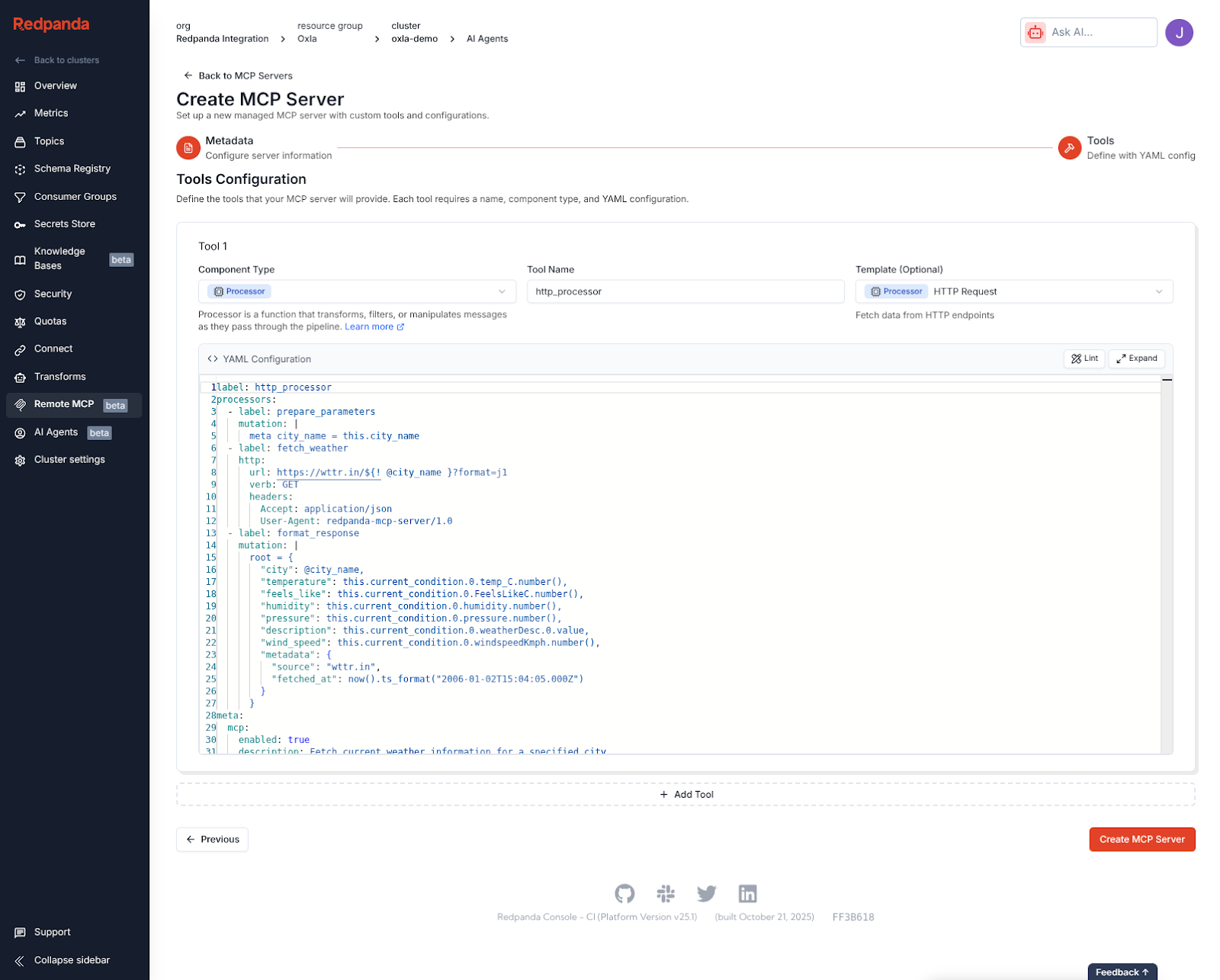
You can create and deploy MCP servers in seconds directly from the Redpanda Cloud Console. To get up and running even sooner, we provide pre-made templates for common use cases.
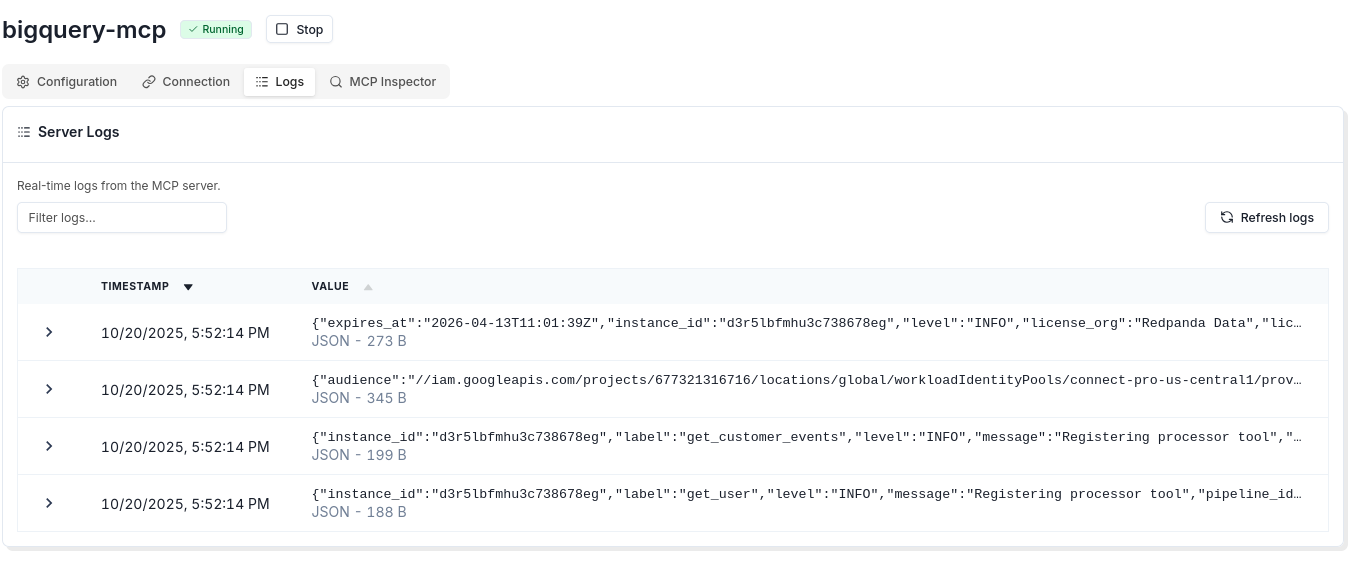
Troubleshooting is simple with built-in access to logs. (Log to your heart’s desire from the Redpanda Connect YAML!)
A key feature for rapid development is the built-in MCP inspector. You can test your server's logic and configuration directly from the Redpanda Cloud UI, seeing the exact requests and responses. The screenshot below, for instance, shows a test against a server that queries BigQuery.
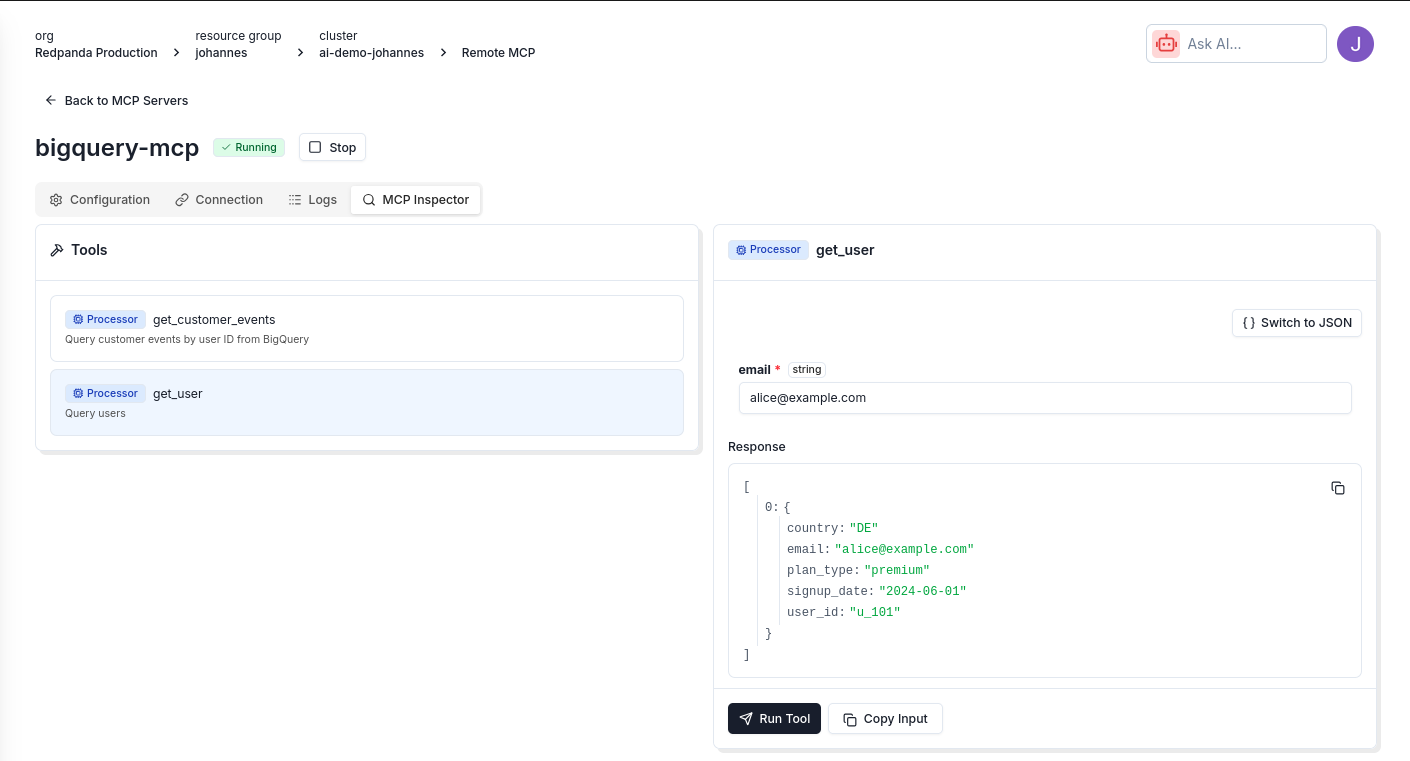
This fast feedback loop — editing the YAML in the console, saving, and testing in the inspector — allows you to iterate and develop powerful, low-code MCP servers in minutes.
Of course, everything you can do in the UI is also available via our Cloud API, so you can integrate MCP server management into your existing GitOps or CI/CD workflows. (See, we said it was simple.)
As promised, you can watch the full demo if you’re curious to learn more.
Redpanda Cloud Remote MCP gives developers a simple, reliable way to connect AI systems with the data they need to be productive. With a single, low-code YAML document, access to hundreds of plug-and-play connectors, and the option to go fully managed with Redpanda Cloud, developers can focus on the creative side of building AI systems, not the mundane.
Redpanda Cloud Remote MCP is available today in beta on all Redpanda Cloud tiers:
While in beta, Remote MCP is included at no extra cost. Usage is metered per Compute Unit, just like standard Redpanda Connect workloads.
If you’re ready to build the future of agentic AI, get started with Redpanda today! If you have questions or want to share your ideas with us, join the Redpanda Community on Slack.
Redpanda ranked #1 in implementation, usability, results, and relationship indexes

Redpanda Shadowing now carries topic data, schemas, offsets, and ACLs on a single link for a low-risk, no-data-loss cutover

Redpanda Operator 26.2 delivers simpler multi-region replication, safer rolling restarts, and deepens K8s support
Subscribe to our VIP (very important panda) mailing list to pounce on the latest blogs, surprise announcements, and community events!
Opt out anytime.