


Kafka Rebalancing: Triggers, Side Effects, and Mitigation Strategies










Kafka rebalancing
Apache Kafka® is a distributed messaging system that efficiently and reliably handles large data volumes. Producers publish data to topics, and Kafka consumers subscribe to these topics to consume the data. It also stores data across multiple brokers and partitions, enabling horizontal scaling.
Nonetheless, Kafka is not immune to its own set of limitations. One of the key challenges is maintaining the balance of partitions across the available brokers and consumers.
This article explores the concept of Kafka rebalancing. We look at what triggers a Kafka rebalance and its side effects. We also discuss best practices to reduce rebalancing occurrences and alternative rebalancing approaches.
Summary of Kafka rebalance: key concepts explained
Before we dive into Kafka rebalancing, we must understand some key concepts.
📌 Two different things are called “rebalancing” in Kafka
This guide is about consumer group rebalancing — how partitions get reassigned among the consumers in a group when one joins, leaves, or fails. That’s a different beast from cluster (partition) rebalancing — moving partition replicas across brokers to even out load — which is handled by tools like Cruise Control. If you came here to balance brokers rather than consumers, that’s the other kind, and this isn’t the guide for it.
Worth noting: Redpanda continuously and automatically performs cluster balancing, including when you add or remove nodes or when a disk fills up, so there’s no separate balancer to stand up and babysit.
What is rebalancing?
The concept of rebalancing is fundamental to Kafka's consumer group architecture. When a consumer group is created, the group coordinator assigns partitions to each consumer in the group. Each consumer is responsible for consuming data from its assigned partitions. However, as consumers join or leave the group or new partitions are added to a topic, the partition assignments become unbalanced. This is where rebalancing comes into play.
Kafka rebalancing is the process by which Kafka redistributes partitions among consumers to ensure each consumer processes approximately equal numbers of partitions. This Kafka consumer rebalance strategy ensures that data processing is evenly distributed across consumers and that each consumer processes data as efficiently as possible. As a result, Kafka can scale efficiently and effectively, preventing any single consumer from becoming overloaded or underused.
How Kafka rebalancing works
Kafka provides several partition assignment strategies to determine how partitions are assigned during a rebalance, and is called an “assignor”. The default partition assignment strategy is round-robin, in which Kafka assigns partitions to consumers sequentially. However, Kafka also provides “range” and “cooperative sticky” assignment strategies, which may be more appropriate for specific use cases.
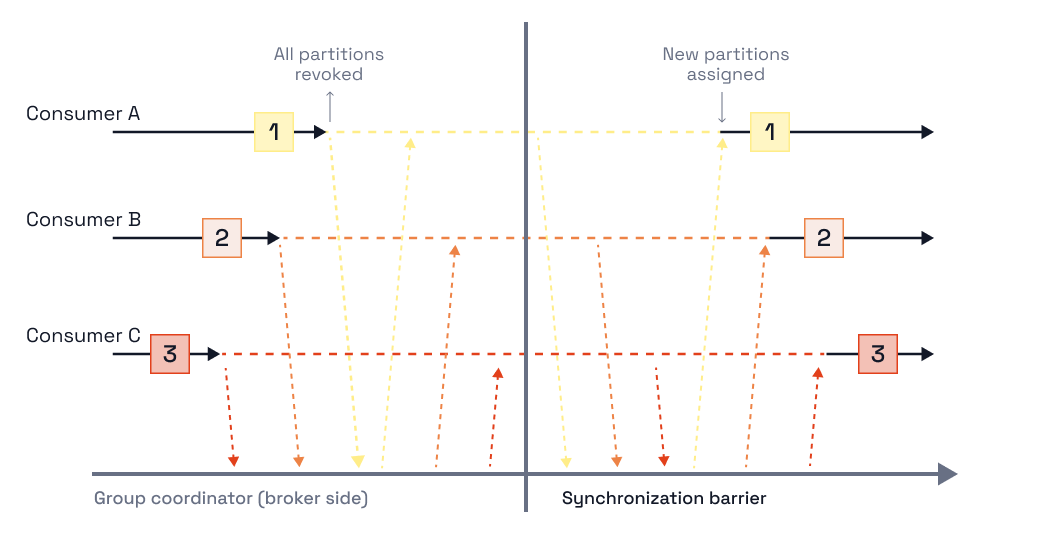
When a rebalance occurs:
- Kafka notifies each consumer in the group by sending a GroupCoordinator message.
- Each consumer then responds with a JoinGroup message, indicating its willingness to participate in the rebalance.
- Kafka then uses the selected partition assignment strategy to assign partitions to each consumer in the group.
During a rebalance, Kafka may need to temporarily pause data consumption. This is necessary to ensure all consumers have an up-to-date view of the Kafka rebalance partition assignments before re-consuming data. On modern KRaft-based clusters, cluster metadata (including group coordination state) propagates through Kafka’s own controller quorum rather than an external service, which keeps these transitions fast.
[CTA_MODULE]
What triggers Apache Kafka rebalancing?
Here are some common scenarios that trigger a Kafka consumer rebalance.
Consumer joins or leaves
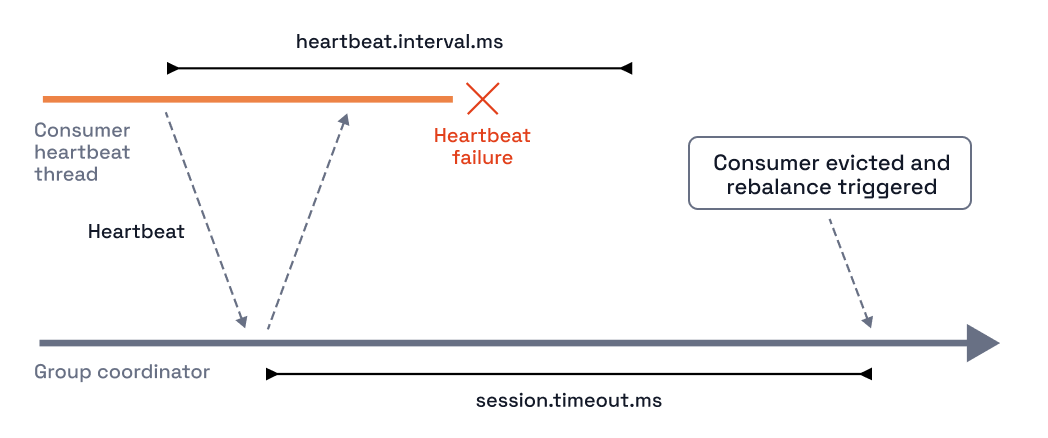
When a new consumer joins or exits a group, Kafka must rebalance the partitions across the available consumers. It can happen during shutdown/restart or application scale-up/down. A heartbeat is a signal that indicates that the consumer is still alive and actively participating in the group. If a consumer fails to send a heartbeat within the specified interval, it is considered dead, and the group coordinator initiates a rebalance to reassign its partitions to other members.
Temporary consumer failure
When a consumer experiences a temporary failure or network interruption, Kafka may consider it a failed consumer and remove it from the group. This can trigger consumer rebalancing, redistributing partitions among the remaining active consumers in the group. However, once the failed consumer is back online, it can rejoin the group and participate in the rebalancing process again.
Consumer idle for too long
When a consumer remains idle for an extended period, Kafka may consider it a failed consumer and remove it from the group. This can trigger consumer rebalancing, redistributing partitions among the remaining active consumers in the group.
Topic partitions added
If new partitions are added to a topic, Kafka initiates a rebalance to distribute the new partitions among the consumers in the group.
Side effects of Kafka rebalancing
While rebalancing helps ensure that each consumer in a group receives an equal share of the workload, it can also affect the performance and reliability of the Kafka cluster. These issues often stem from group rebalance events triggered by system changes, and identifying the root cause may require monitoring tools to pinpoint which consumer or broker is responsible. Some unintended consequences are given below.
Increased latency
The rebalancing process involves moving partitions from one broker or consumer to another, which can result in some data being temporarily unavailable or delayed. In addition, depending on the size of the Kafka cluster and the volume of data being processed, rebalancing can take several minutes or even hours, increasing the latency consumers experience.
Reduced throughput
Kafka rebalancing causes some brokers or consumers to become overloaded or underutilized, leading to slower data processing. However, once the rebalancing process is complete, the Kafka cluster's performance returns to normal.
Increased resource usage
Kafka uses additional resources, such as CPU, memory, and network bandwidth, to move partitions between brokers or consumers. As a result, rebalancing increases resource usage for the Kafka cluster and can adversely impact the performance of other applications running on the same infrastructure.
Potential data duplication and loss
Kafka rebalancing may result in significant data duplication (40% or more in some cases), adding to throughput and cost issues. In rare cases, Kafka rebalancing leads to data loss if improperly handled. For example, a consumer leaves a consumer group while it still has unprocessed messages. Those messages may be lost once the rebalancing process begins. To prevent data loss, it is essential to ensure that messages are properly committed to Kafka and that all consumers participate in rebalancing regularly.
Increased complexity
Kafka rebalancing adds complexity to the overall architecture of a Kafka cluster. For example, rebalancing involves coordinating multiple brokers or consumers, which can be challenging to manage and debug. It may also impact other applications or processes that rely on Kafka for data processing. As a result, you may find it more difficult to ensure the overall reliability and availability of the system.
Redpanda: a powerful Kafka alternative
[CTA_MODULE]
Measures to reduce rebalancing
There are measures you can take to reduce rebalancing events. However, rebalancing is necessary and must occur occasionally to maintain reasonably reliable consumption.
Increase session timeout
The session timeout is the maximum time a Kafka consumer can wait before sending a heartbeat to the broker. Increasing the session timeout increases the time a broker waits before marking a consumer as inactive. You can increase the session timeout by setting the session.timeout.ms parameter to a higher value in the Kafka client configuration. However, keep in mind that setting this parameter too high leads to longer periods of consumer inactivity.
Reduce partitions per topic
Having too many partitions per topic increases the frequency of rebalancing. When creating a topic, you can reduce the partition number by setting the num.partitions parameter to a lower value. However, remember that reducing the number of partitions also reduces the parallelism and throughput of your Kafka cluster.
Increase poll interval time
Sometimes messages take longer to process due to multiple network or I/O calls involved in processing failures and retries. In such cases, the consumer may be frequently removed from the group. The consumer configuration specifies the maximum time the consumer can be idle before it is considered inactive and removed from the group is max.poll.interval.ms. Increasing the max.poll.interval.ms value in the consumer config helps avoid frequent consumer group changes.
What is incremental cooperative rebalance?
The incremental cooperative rebalance protocol was introduced in Kafka 2.4 to minimize the disruption caused by Kafka rebalancing. In a traditional rebalance, all consumers in the group stop consuming data while the rebalance is in progress, commonly called a “stop the world effect”. This causes delays and interruptions in data processing.
The incremental cooperative rebalance protocol splits rebalancing into smaller sub-tasks, and consumers continue consuming data while these sub-tasks are completed. As a result, rebalancing occurs more quickly and with less interruption to data processing.
The protocol also provides more fine-grained control over the rebalancing process. For example, it allows consumers to negotiate the specific set of partitions they will consume based on their current load and capacity. This prevents overloading individual consumers and ensures that partitions are assigned more evenly.
What is static group membership in Kafka rebalancing?
Static group membership is a method of assigning Kafka partitions to consumers in a consumer group in a fixed and deterministic way without relying on automatic partition assignment. In this approach, the developer defines the partition assignment explicitly instead of letting the Kafka broker manage it dynamically.
With static group membership, consumers in a consumer group explicitly request the Kafka broker to assign them specific partitions by specifying the partition IDs in their configuration. Each consumer only consumes messages from a specific subset of partitions, and the partition assignment remains fixed until explicitly changed by the consumer.
However, it's important to note that static group membership can lead to uneven workload distribution among consumers and may be suitable only for certain use cases.
How to create a consumer with static membership
To use static group membership in Kafka, consumers must use the assign() method instead of the subscribe() method to specify the partition assignments. The assign() procedure takes a list of TopicPartition objects, identifying the topic and partition for assignment.
Here’s a sample code in Java to create a consumer with static membership.
import org.apache.kafka.clients.consumer.ConsumerConfig;
import org.apache.kafka.clients.consumer.ConsumerRecord;
import org.apache.kafka.clients.consumer.ConsumerRecords;
import org.apache.kafka.clients.consumer.KafkaConsumer;
import org.apache.kafka.common.TopicPartition;
import java.util.Arrays;
import java.util.Collections;
import java.util.Properties;
public class StaticPartitionConsumer {
public static void main(String[] args) {
// Set up Kafka consumer configuration
Properties props = new Properties();
props.setProperty(ConsumerConfig.BOOTSTRAP_SERVERS_CONFIG, "localhost:9092");
props.setProperty(ConsumerConfig.GROUP_ID_CONFIG, "static-group");
props.setProperty(ConsumerConfig.ENABLE_AUTO_COMMIT_CONFIG, "false");
props.setProperty(ConsumerConfig.AUTO_OFFSET_RESET_CONFIG, "earliest");
// Set up Kafka consumer with statically assigned partitions
KafkaConsumer<String, String> consumer = new KafkaConsumer<>(props);
TopicPartition partition0 = new TopicPartition("my-topic", 0);
TopicPartition partition1 = new TopicPartition("my-topic", 1);
consumer.assign(Arrays.asList(partition0, partition1));
// Start consuming messages from assigned partitions
try {
while (true) {
ConsumerRecords<String, String> records = consumer.poll(1000);
for (ConsumerRecord<String, String> record : records) {
System.out.printf("partition = %d, offset = %d, key = %s, value = %s\n",
record.partition(), record.offset(), record.key(), record.value());
}
consumer.commitSync();
}
} finally {
consumer.close();
}
}
}
In this example:
- KafkaConsumer is configured with the group.id property set to static-group
- Two partitions (partition0 and partition1) of my-topic are explicitly assigned to the consumer using the assign() method.
- The consumer polls for new messages from the assigned partitions using the poll() method and commits the offsets using the commitSync() method.
Have questions about Kafka or streaming data?
[CTA_MODULE]
Conclusion
Kafka rebalancing is an important feature that allows consumers in a Kafka cluster to dynamically redistribute the load when new consumers are added, or existing ones leave. It ensures that all consumers receive an equal share of the work and helps prevent overloading any one consumer. However, excessive rebalancing results in reduced performance and increased latency, and may even lead to duplicates and/or data loss.
So, it's essential to configure Kafka consumers properly and follow best practices to minimize the frequency and impact of rebalancing. By understanding how Kafka rebalancing works and implementing the right strategies, developers and administrators can ensure a smooth, efficient Kafka cluster that delivers reliable, scalable data processing.
[CTA_MODULE]