Push-button migration from Confluent to Redpanda
Redpanda Shadowing now carries topic data, schemas, offsets, and ACLs on a single link for a low-risk, no-data-loss cutover

.png)
Get instant answers about Redpanda directly in your IDE with our new Model Context Protocol server








Imagine you're crafting the perfect Redpanda cluster configuration, when suddenly you need to double-check a setting. Do you:
If you picked B, you're going to love what we just shipped.
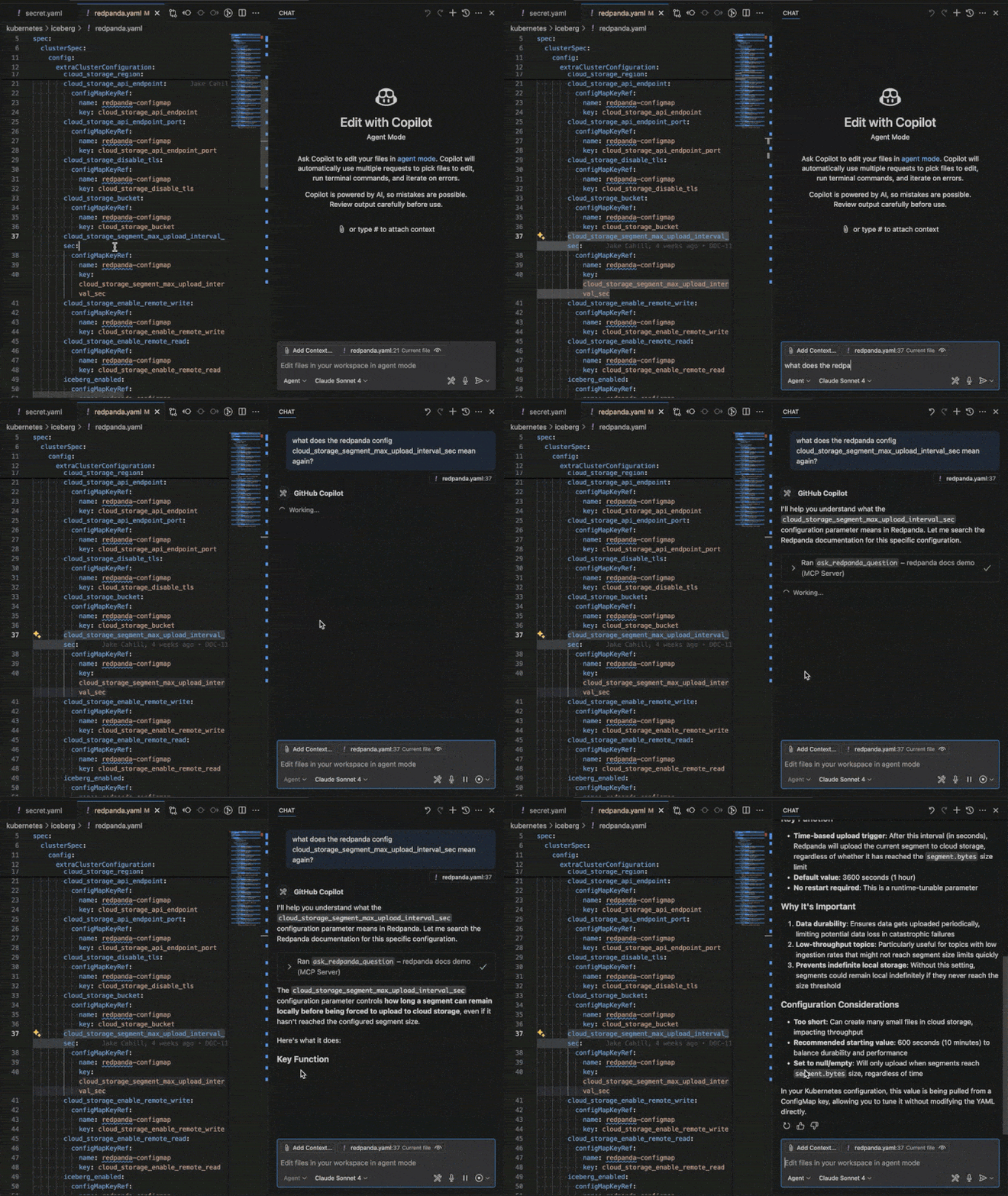
The Model Context Protocol (MCP) is an open standard that enables AI models to interact with external tools and services through a unified interface. Think of it as a bridge that connects your AI assistant to specialized tools and knowledge sources, in this case, the entire Redpanda documentation ecosystem.
Unlike traditional chatbots that give generic answers, MCP servers provide contextual, accurate responses from authoritative sources. It's like having a domain expert sitting next to you, but one who never judges your variable names.
As developers ourselves, we know the pain of context switching. You're deep in code, configuring a Redpanda cluster, when you need to check the syntax for a specific setting. Suddenly, you're juggling browser tabs, searching through documentation, and losing your flow.
Our MCP server isn't just a fancy search box. It's powered by an AI assistant (thanks Kapa.ai) that:
Adding the Redpanda MCP server to your workflow is simple:
Click this link to automatically add the server: Add to VS Code
Or manually create a .vscode/mcp.json file in your workspace:
{
  "servers": {
    "redpanda": {
      "url": "https://docs.redpanda.com/mcp"
    }
  }
}Edit your Claude configuration file to add:
{
  "mcpServers": {
    "redpanda-docs": {
      "url": "https://docs.redpanda.com/mcp"
    }
  }
}Once connected, treat your AI like that colleague who somehow knows everything about your tech stack. You can even ask it to run the steps returned by our MCP server!
For the technically curious, our MCP server is built as a Netlify Edge Function that:
The entire implementation is open and transparent. You can see exactly how it works by visiting our GitHub repository.
Ready to supercharge your Redpanda development workflow?
👉 Visit docs.redpanda.com/mcp for complete setup instructions
👉 Questions? Ask them directly in your IDE once you're connected!
Have feedback about the MCP server or have ideas for additional features? We'd love to hear from you in our Redpanda Community on Slack.
Redpanda Shadowing now carries topic data, schemas, offsets, and ACLs on a single link for a low-risk, no-data-loss cutover

A database designed for agentic governance, now available on Google Cloud
Subscribe to our VIP (very important panda) mailing list to pounce on the latest blogs, surprise announcements, and community events!
Opt out anytime.