



.png)
Redpanda named a Leader in G2’s Fall 2026 Event Stream Processing Reports
Redpanda ranked #1 in implementation, usability, results, and relationship indexes


Connect, secure, and stream—all in one simple platform








We’re proud to launch Redpanda Connect with Ockam: the first zero-trust streaming data platform! Redpanda Connect with Ockam is the only enterprise-scale, zero-trust, streaming data platform that's simultaneously easy to deploy, secure by design, and highly performant.
Redpanda and Ockam is a natural partnership as both companies have the same ethos: to enable every developer to build distributed systems, at scale, with simple tools. Both companies' products are also based on popular open-source projects built by experienced, high-performing teams.
“Enterprise executives tell me that their high-value streaming applications take a long time to build and to ship,” said Matthew Gregory, Ockam's CEO.
“Their biggest obstacle is the construction of secure streaming data connections across their siloed enterprise, and between partner companies. Secure data streaming is now simple to set up, trivial to maintain, and almost impossible to mess up. We've unlocked data so application development can move fast.”
Enterprise Kafka product vendors defer zero-trust implementation details to their customers. It's difficult — even for sophisticated engineering organizations — to pull together a team that can choose and assemble the dozens of parts required to build a secure-by-design streaming data platform. Redpanda Connect with Ockam empowers a single developer to easily create end-to-end encrypted streaming pipelines that can connect hundreds of applications across clouds and hybrid infrastructure. It builds trust in data streams, eliminates sources of risk to critical data, and removes the operational complexities inherent in managing keys at scale.
Redpanda provides a declarative streaming data platform that enables developers and organizations to build simple, chained, and stateless processing steps for their data pipelines. Our partnership with Redpanda brings a truly zero-trust capability to these pipelines.
Ockam's cryptographic protocols and data integrity guarantees remove the risk of MITM and supply chain attacks that could otherwise tamper with data inflight and lead to data poisoning; highlighted as one of the OWASP Top 10 risks for companies that leverage AI and Large Language Model (LLM) systems.
The mutual authentication and encrypted data protocols that Ockam provides also mean organizations can transmit highly sensitive data with cryptographic guarantees so only the intended recipients will be able to decrypt and process it. This will unlock new high-value applications that businesses may have been unwilling to explore due to privacy and governance risk, or complexity.
“We help the world's largest companies build and scale streaming applications," said Alex Gallego, Redpanda's CEO. "Redpanda Connect with Ockam was conceived to empower our customers to build streaming data applications with ease.
"Redpanda Connect comes with over 250 pre-built integrations that will quickly connect to and unlock your data silos. Ockam provides the mutual authentication and end-to-end encryption that zero-trust streaming data applications require. Together with Ockam, we've abstracted away all of the complex pieces that cause engineering teams to stumble."
Redpanda’s State of Streaming Data Report 2023-2024 surveyed 300 streaming data users across various industries.
These are alarming numbers! Despite the obvious benefits that a real-time streaming data architecture provides, companies struggle to ship data pipelines to their applications. Often, they're blocked for several quarters. Once they get to production, they realize that their data doesn't have the security guarantees they need or expect from their streaming data infrastructure.
Redpanda Connect with Ockam aims to move these numbers to 0% and 100%. Here’s how.
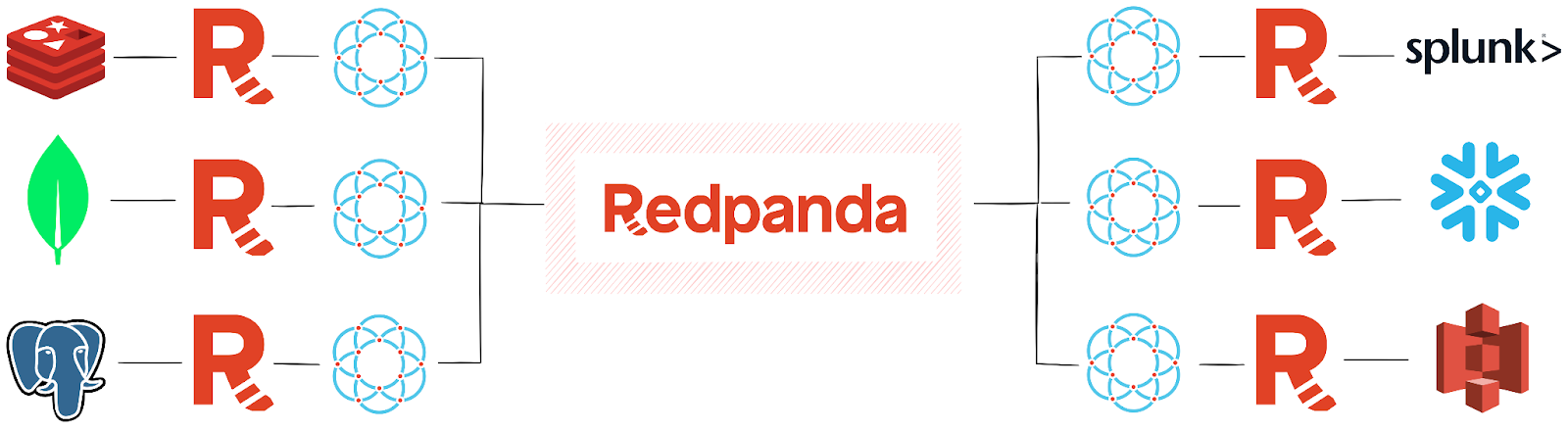
Redpanda Connect (formerly known as Benthos) empowers engineers to build connectors and integrations to over 200 applications, including SQL, Mongo, Snowflake, Cassandra, Redis, Splunk, AWS Lambda, Azure CosmosDB, and GCP Cloud Storage. Redpanda Connect can process streaming data with transforms, mapping, filtering, hydration, and enrichment capabilities.
Zero trust in your data streaming infrastructure allows you to have absolute trust in your data and applications. Ockam adds the guarantees of data confidentiality, integrity, and authenticity, so you can enforce data governance and privacy policies at scale.
Each producer creates its own unique cryptographically provable identity and encryption keys. The producers use their keys to establish trusted secure channels through Redpanda Cloud and to the consumers across the streaming platform. All the data that moves through your streaming data platform is encrypted in motion — even when it's passing through a broker. Keys, enrollments, and credentials are safely created, stored, rotated, and revoked automagically so there's almost nothing to manage.
Ockam makes it simple to build trust across your entire data layer in a way that's almost impossible to mess up.
Redpanda Cloud is a complete streaming data platform delivered as a fully managed service with automated upgrades and patching, data and partition balancing, and 24×7 support. It continuously monitors and maintains your clusters along with the underlying infrastructure to meet strict performance, availability, reliability, and security requirements.
The example below will show you how to use Ockam to connect any input sources (e.g., MongoDB, PostgreSQL, a Kafka stream, etc.) to any output (e.g., Snowflake, S3, Splunk, etc.), automatically encrypting all your data in motion. You can run this complete example locally in less than two minutes by copying the relevant sections below.
First, copy the code block below and save it to a file named consumer.yaml:
Next, save the code block below to producer.yaml
And data will start flowing. These commands use Homebrew to install tools and Docker to run containers, so before you begin, please install them on your machine.
Walking through the commands one-by-one will explain what each step achieves. Starting with getting Redpanda running locally:
These two commands install Redpanda and start a container. Now a broker is running in a container that we will use to stream and process data with Redpanda Connect.
The brew command is how you install Ockam Command into your local environment. ockam enroll will open a browser window and guide you through either signing up or signing in to Ockam Orchestrator. Ockam Orchestrator will allow you to securely manage the enrollment of thousands or more processing nodes without the need to manually push identities, keys, or credentials to each node. This initial enroll will establish your local machine as an Administrator within the project that has been set up for you within Ockam Orchestrator.
The ockam project ticket command is how you generate a ticket that will admit another node into your project. The arguments here specify that:
1 time. This ensures that the ticket is for the desired purposes and if it's inadvertently leaked there is no opportunity for an attacker to re-use it to gain access to your project.10 minutes. This also reduces the risk posed by a ticket leaking, you can adjust it to any time window that's appropriate for your use case.consumer. This will add an attribute to any node that enrolls with this ticket, and policy definitions can then use those attributes to apply Attribute Based Access Controls and restrict which nodes can communicate with each other.consumer_relay. This provides a named route for other nodes to find this node, even if both nodes are on different network.The output of that command, the enrollment ticket, is then redirected out to a file named ticket.
This is where you start your consumer with Redpanda Connect. It uses Docker to start a new container named consumer, on an isolated network named redpanda where the broker is available, passing in the consumer.yaml and ticket files.
The consumer.yaml file defines how to receive the data:
This input block shows the standard Kafka configuration options under the kafka element, these specify the broker, topics, and consumer group to use. The following three lines are the Ockam-specific additions that allow this input source to receive and process end-to-end encrypted data streams:
allow_producer: the attribute that needs to exist on the other node before allowing each node to establish a trusted channel between each other.relay: the name of the relay to connect this node to.enrollment_ticket: the enrollment ticket to use to admit this node into the Ockam Orchestrator project.
The pipeline and processors block does a basic transformation of received data, and converts the message attribute to be all in upper-case. While not an entirely useful transformation in production, this allows you to independently verify that the consumer was able to decrypt and process the data.
The last part of the consumer.yaml configuration is the output block. This example implements a simple stdout output. As the commented-out Snowflake block highlights, other destinations can receive your final processed data stream by providing their configuration settings.
The code snippet for starting data producers shows how Ockam makes enrolling any number of nodes painless:
The for i in $(seq 1 3); do line creates a for loop that will create 3 separate producers. Each producer will generate a unique identity, enroll in the Ockam Orchestrator project, and establish a secure channel with the consumer node. If you feel ambitious you can increase that 3 to a higher number, just be aware the script will run a new docker container for each producer so you could quickly exhaust your local system resources.
The ockam project ticket command generates an enrollment ticket, just as it did in the earlier section that explained the setup of the consumer. The primary difference with this ticket is that the attribute is set to producer and there is no need to set up a relay for a producer.
The docker run command runs the same image as before, on the same network, giving each image a unique name with a prefix of producer, and passing in the producer.yaml and ticket for each node.
The producer.yaml configuration file has two blocks of importance:
The input block here is generating random data, useful for the sake of a self-contained example but something you would replace in a real-world use case. On a 1-second interval new data that includes the hostname (allowing you to verify that there are three separate nodes producing data), and fake data for the email and message attributes in the payload, is sent to the output.
If you recall the explanation earlier, the message field is later processed by the consumer to be entirely in upper-case before being output to stdout. For a real-world use case, the commented out block gives an example of how to use a Mongo database as the input source for a producer.
The output block in producer.yaml contains the standard Kafka configuration, along with three Ockam-specific options:
route_to_consumer: the full route to the relay that was set up for the consumer.allow_consumer: the attribute that needs to exist on the other node before allowing each node to establish a trusted channel between each other.enrollment_ticket: the enrollment ticket to use to admit this node into the Ockam Orchestrator project.Now everything is up and running! You'll see in the log output that the consumer is receiving data, from different hosts, and that the message in each payload is upper-case. If you open the Redpanda Console or run rpk topic consume topic_A you'll see that the encrypted messages in topic_A are not readable by the broker or anybody else that might have access to the topic.
By adding or changing a few lines in the consumer.yaml and producer.yaml files it's possible to:
producer.yaml and/or outputs consumer.yaml to connect, secure, and stream data between any of the hundreds of different integrations supported by Redpanda Connect.To learn more about Ockam, you can check out our website and follow us on LinkedIn. If you have questions about Redpanda Connect or all things streaming data, drop into the Redpanda Community on Slack and ask away.
Originally published on Ockam.io
Redpanda ranked #1 in implementation, usability, results, and relationship indexes
Redpanda Shadowing now carries topic data, schemas, offsets, and ACLs on a single link for a low-risk, no-data-loss cutover
Redpanda Operator 26.2 delivers simpler multi-region replication, safer rolling restarts, and deepens K8s support
Subscribe to our VIP (very important panda) mailing list to pounce on the latest blogs, surprise announcements, and community events!
Opt out anytime.