
Build an AI agent once and reuse it across teams
How Redpanda Agentic Data Plane keeps IT, HR, and ops agents unified and controlled across reuses

A guide on choosing the right technologies for streaming data APIs and how to implement them








It’s always a good time to learn something new and improve your tech knowledge. On my part, I was curious about building API/applications using streaming data platforms, and decided to distill everything I learned in this blog post for others who may just be getting started in the field.
When learning any technical concept— in this case streaming data—the most natural sequence of events for any developer is to build an API or application. So, that’s exactly what I did.
In this post, I’ll walk you through my own experience selecting the best streaming data platform, the right framework for my API, and then using these technologies to easily build a to-do app. The entire demo is available in my GitHub repository.
Before we get into the technicalities, let’s start with the basics—like what to look for when choosing the right streaming data platform.
When you think of “streaming data platform”—you probably think of Apache Kafka®. It’s the traditional solution that changed the streaming data game back in 2011. But nowadays, Kafka is synonymous with complexity, overburdened resources, and limited scalability.
So, when you’re learning the ropes of streaming data and building your first applications, it’s wiser to adopt a simpler, easily scalable, and more efficient platform that provides:
This is what I was on the hunt for, and that’s when I stumbled upon Redpanda.
Redpanda can be described as a drop-in Kafka replacement that’s fully compatible with Kafka APIs—but spares you from the dreaded Kafka complexity. The more I explored Redpanda’s capabilities, the more it sounded like what I needed. Plus, there was plenty of documentation and a Slack Community where I could chat with their engineers or others who might be in the same boat.
One of the most obvious advantages is the Redpanda CLI (a.k.a rpk), which has a dev-friendly interface and lets you manage your entire Redpanda cluster, without having to run a separate script for each function (like with Kafka). With rpk, bootstrapping your local Kafka-compatible Redpanda cluster takes seconds. All you need do is to run rpk container start (assuming you have Docker Desktop).
Creating topics is probably the first thing a developer would want to do, so let’s take a quick look at how this works in rpk.
The rpk topic * commands help you manage topics and produce/consume messages. Here’s the rpk topic group of commands to get you started:
# create a topic called "todo-list"
rpk topic create todo-list

# produce a message to topic todo-list
rpk topic produce todo-list
# producting a mesage with key:value format with \n as message separator
rpk topic produce -f "%k:%v\n" todo-list
# finally what other options while producing
rpk topic poduce --help

# consume messages from topic todo-list
rpk topic consume todo-list
# consume messages only latest messages
rpk topic consume --offset=end todo-list
# finally what other options while consuming
rpk topic consume --help
Check the rpk get started guide for more details on the other commands and options.Another benefit is the Redpanda Console, which lets you view, manipulate, and debug your topics and messages. This significantly speeds up developer productivity!
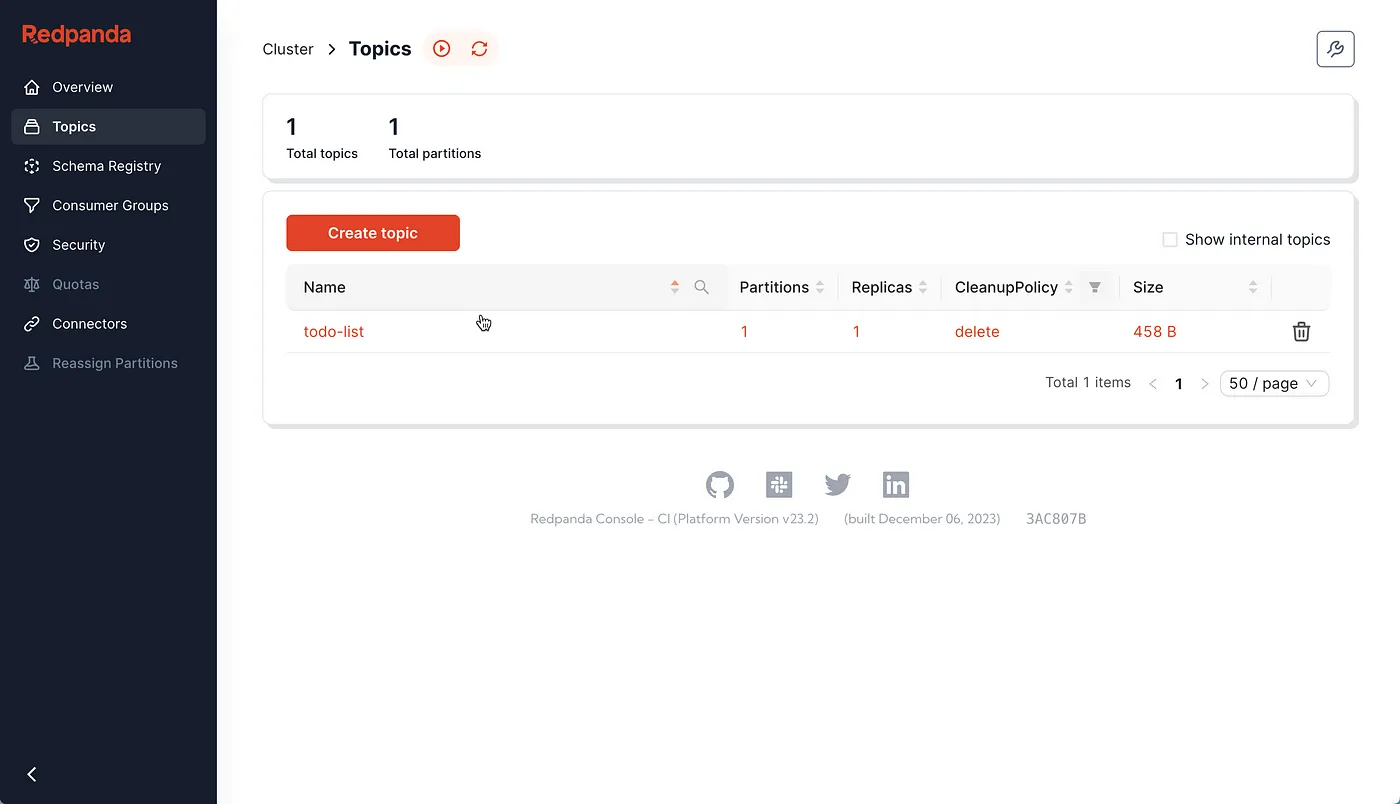
There are plenty of other features that convinced me, like the built-in Schema Registry, automatic deserialization of Protobuf messages, and much more. But we’ll get to them later on in the post.
With our streaming data platform in place, the next step was to find a framework for my API that would interact with the Redpanda topics. The question to ask here is: what do you need to build a worthy streaming data API?
Here’s what I’d advise:
The natural choice for building APIs has always been REST. With years of development, we know that REST is good, but it also has its own constraints. It may not support one or more of the above needs without adding a few extra dependencies.
In my humble opinion, adding extra dependencies only adds more burden on the developer. Not just when building the API, but also maintaining it. Not to mention the added risk of opening the API up to security vulnerabilities.
So, what framework did I end up going with? I chose gRPC. According to the gRPC website:
“gRPC is a modern open-source high-performance Remote Procedure Call (RPC) framework that can run in any environment. It can efficiently connect services in and across data centers with pluggable support for load balancing, tracing, health checking, and authentication. It is also applicable in the last mile of distributed computing to connect devices, mobile applications, and browsers to backend services.”
Let’s quickly analyze how gRPC maps our requirements for building an effective streaming data API.
That’s enough theory for now. Let’s move on to the demo, which is a simple to-do app. To keep this post brief, I’ve only included the essential code snippets but you can find the entire demo with detailed instructions in this GitHub repo.
To give you a better idea of what we’ll be building, here’s a diagram of the to-do app demo.
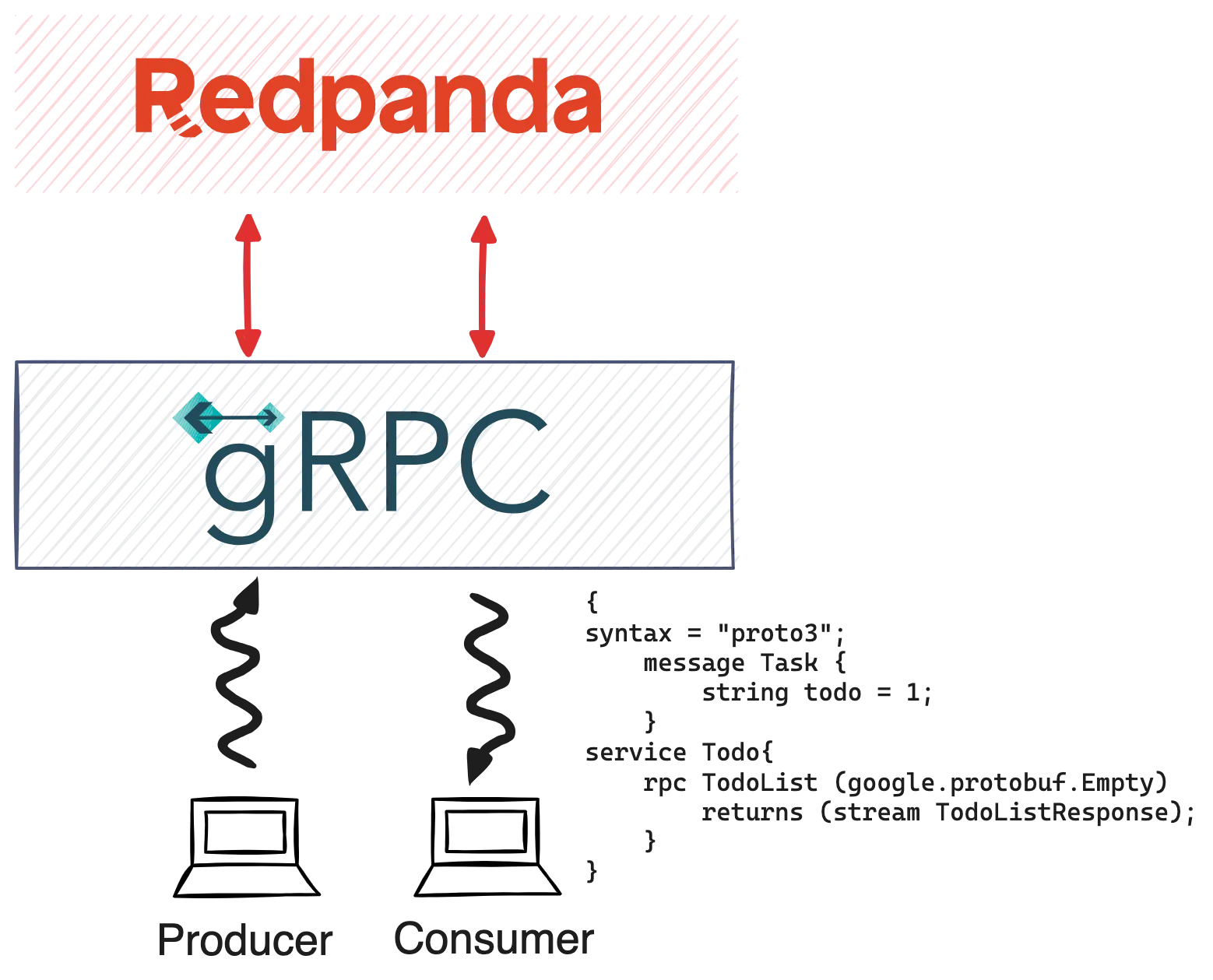
In the GitHub repo, you’ll find the docker-compose.yml that allows you to start the Redpanda server and Console, which is reachable on http://localhost:8080.
docker compose up redpanda-0 console -d
The todo-app has the following IDL, defined using Protobuf.
syntax = "proto3";
package todo;
import "google/protobuf/timestamp.proto";
import "google/protobuf/empty.proto";

option go_package="https://github.com/kameshsampath/demo-protos/golang/todo";
message Task {
	string title = 1;
	string description = 2;
	bool completed = 3;
	google.protobuf.Timestamp last_updated = 4;
}
service Todo {
  rpc AddTodo (TodoAddRequest) returns (TodoResponse);
  rpc TodoList (google.protobuf.Empty) returns (stream TodoListResponse);
}
message TodoAddRequest {
  Task task = 1;
}
message TodoResponse {
  Task task = 1;
  int32 partition = 2;
  int64 offset  = 3;
}
message Error {
  string topic = 1;
  int32 partition = 2;
  string message  = 3;
}
message Errors {
  repeated Error error = 1;
}

message TodoListResponse {
  oneof response {
    TodoResponse todo = 1;
    Errors errors = 2;
  };
}
The todo-app application takes care of registering the todo.proto with Redpanda Schema Registry using the Subject Name per Topic Strategy.
For the demo we just name the schema subject to be todo-list-value, allowing the schema to be used for serializing/deserializing the topic value.
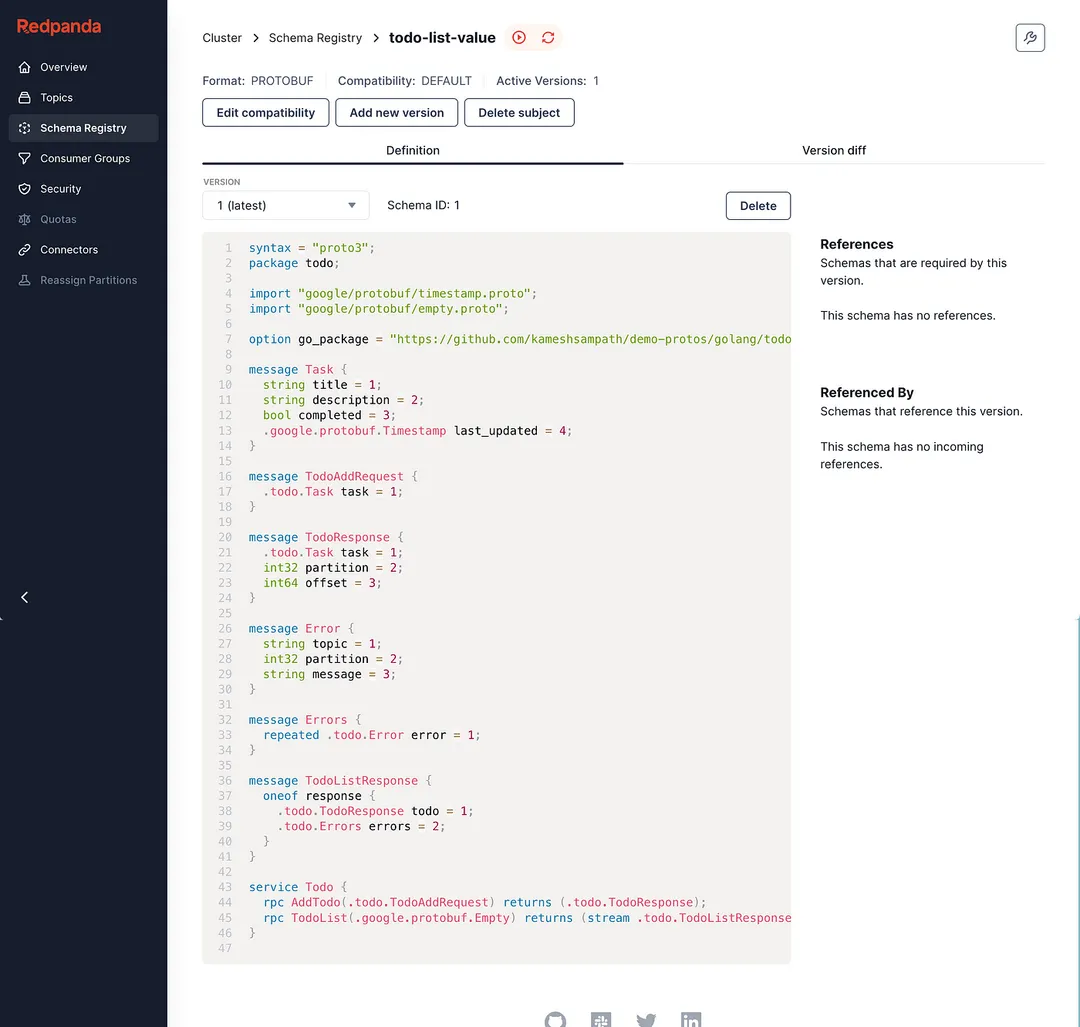
The following snippet shows the implementation of the TodoList service method of the Todo service. This allows us to perform server-side streaming (uni-directional) to list the todos (i.e., the messages from todo-list topic).
// TodoList implements todo.TodoServer.
func (s *Server) TodoList(empty *emptypb.Empty, stream todo.Todo_TodoListServer) error {
ch := make(chan result)
go func() {
 s.poll(ch)
}()

for {
 select {
 case r := <-ch:
  {
   if errs := r.errors; len(errs) > 0 {
    var errors = make([]*todo.Error, len(errs))
    for _, err := range errs {
     log.Debugf("Error Details",
      "Topic", err.Topic,
      "Partition", err.Partition,
      "Error", err.Err,
     )
     errors = append(errors, &todo.Error{
      Topic:     err.Topic,
      Partition: err.Partition,
      Message:   err.Err.Error(),
     })
    }
    stream.Send(&todo.TodoListResponse{
     Response: &todo.TodoListResponse_Errors{Errors: &todo.Errors{
      Error: errors,
     }},
    })
   }
   b := r.record.Value
   task := new(todo.Task)
   if err := s.serde.Decode(b, task); err != nil {
    //Skip Sending invalid data, just log the error
    log.Errorw("Error Decoding task",
     "Data", string(b),
     "Error", err.Error())
   } else {
    stream.Send(&todo.TodoListResponse{
     Response: &todo.TodoListResponse_Todo{
      Todo: &todo.TodoResponse{
       Task:      task,
       Partition: r.record.Partition,
       Offset:    r.record.Offset,
      },
     },
    })
   }
  }
 }
}
}

// poll fetches the record from the backend and adds that the channel
func (s *Server) poll(ch chan result) {
log.Debugf("Started to poll topic:%s", s.config.DefaultProducerTopic())
//Consumer
for {
 fetches := s.client.PollFetches(context.Background())
 if errs := fetches.Errors(); len(errs) > 0 {
  ch <- result{
   errors: errs,
  }
 }

 fetches.EachPartition(func(p kgo.FetchTopicPartition) {
  for _, r := range p.Records {
   ch <- result{
    record: r,
   }
  }
 })
}
}
The implementation uses the franz-go as the Go Kafka client library. As you see from the code snippet, gRPC makes it easier to process and send the topic message seamlessly to the consumer.
Let’s test it. Run the following command to bring up the todo-app gRPC server along with the gRPC client that reads the message ingested into the todo-list topic:
docker compose up -d todo-app todo-list
The todo-app (ghcr.io/kameshsampath/grpc-todo-app/server) is the containerized image of the todo demo gRPC server and the todo-list is the containerized image of the todo demo client (ghcr.io/kameshsampath/grpc-todo-app/client) that streams the list of todos from the backend Kafka topic todo-list.
Assuming the todo-app (gRPC server) and todo-list (todo list streaming client) are started successfully.
Open a new terminal and run the following command to check the logs of todo-app:
docker compose logs -f todo-app
A successful start of the server will show the following output (trimmed logs for brevity):
todo-app-server  | ... Server started on port 9090
todo-app-server  | ... Started to poll topic
Press ctrl + c or cmd + c to quit the todo-app server logs and run the following command to view the logs of the todo-list application. We’ll refer to this terminal as todo-list-logs-terminal.
docker compose logs -f todo-list
On another new terminal, run the following command using grpcurl—a cURL-like utility for gRPC—to post a todo task to the todo-list topic:
PORT=9090 grpcurl -plaintext -d @ "localhost:$PORT" todo.Todo/AddTodo <<EOM
{
 "task": {
   "title": "Finish gRPC Data Streaming Story",
   "description": "Complete the  gRPC Data Streaming Medium story, on how to build Data Streaming API using gRPC and Redpanda",
   "completed": false
 }
}
EOM
Once the post is successfully on the todo-list-logs-terminal, you should see an output like the following:
todo-list  | 2023-12-07T06:35:07.692Z   INFO    client/main.go:56Task
{
 "Title": "Finish gRPC Data Streaming Story",
 "Description": "Complete the  gRPC Data Streaming Medium story, on how to build Data Streaming API using gRPC and Redpanda",
 "Completed": false,
 "Last Updated": "Thursday, 01-Jan-70 00:00:00 UTC",
 "Partition": 0,
 "Offset": 2
}Note: the log message was formatted for readability.
One of the coolest developer-centric features in Redpanda Console is it automatically deserializes Protobuf messages. This is highly useful during API development when you want to debug the messages sent to the topic.

Note: Automatic deserialization of Protobuf messages is possible only when the respective schema is registered with the Schema Registry.
This was just a beginner’s guide to building a streaming data API using two very powerful technologies. To summarize, here’s what we learned:
You can find the completed demo sources of the todo-app on my GitHub.
Keep exploring Redpanda to see how it can massively simplify your Kafka-powered systems with its simplicity and high performance. I also recommend checking out their tutorials and the free courses over at Redpanda University.
If you have any questions about this demo, you can find me on the Redpanda Community on Slack!
This post was originally published on Medium
Subscribe to our VIP (very important panda) mailing list to pounce on the latest blogs, surprise announcements, and community events!
Opt out anytime.